Moving from SQL Source Control to Flyway Desktop
Published 02 April 2022
SQL Source Control is a popular database version control tool for SQL Server databases and is available for sale as part of the SQL Toolbelt Essentials. It continues to be actively maintained and supported.
Why move to Redgate Flyway Enterprise?
SQL Source Control is an industry-proven SQL Server database version control tool that offers an SSMS-centered experience for users. It continues to be actively maintained and supported.
Some SQL Source Control customers also need database migration script generation and deployment capabilities, in addition to multi-DBMS support. SQL Source Control does not offer these capabilities, so for these customers, Redgate Flyway Enterprise is a good next step. It offers:
- Multi-DBMS support with foundational capabilities for 50+ DBMS
- Advanced object-level version control capabilities across SQL Server, Oracle, PostgreSQL, and MySQL
- Migration script generation and drift detection built on a best-in-class database comparison
- Automated database change management workflows across a database estate
- Performance advantages
For more information, see Why Redgate Flyway Enterprise in our documentation to discover more.
Compare SQL Source Control with Redgate Flyway Enterprise:
Feature | SQL Source Control | Redgate Flyway Enterprise |
SSMS integration | Yes | Researching - Contact us for more details |
Version control integration | Yes | Better Git support |
View version control history | Yes | Use your Git system |
Object locking | Yes | No, but can be self-configured |
State-based deployments | Yes | Yes |
Migration script generation | No | Yes |
Migrations-based deployments | No | Yes |
Roll back changes (Undo) | Yes | Yes |
Unlimited schemas | Yes | Yes |
Code analysis | No | Yes |
Support for customers who want to move to Redgate Flyway Enterprise
For customers who wish to move to Redgate Flyway Enterprise, both Redgate Flyway and SQL Source Control can be installed side-by-side for testing and planning purposes. They should not be used on the same project. We are here to support SQL Source Control customers moving to Redgate Flyway – please contact us to find out how we can help.
For new customers, we encourage you to start with Flyway.
Any questions?
Please let us know if you have any questions/concerns about this transition. Flyway Desktop should feel familiar to SQL Source Control users since it captures the DDL create script for each object and allows you to version control these changes in Git . You can also import your existing SQL Source Control projects to Flyway and keep all your Git history.
Before making the move to Flyway
Learn more about Flyway Desktop by watching this 6.5 minute video for a quick overview.
Flyway Desktop is a standalone tool since it supports over 50 different databases. It integrates directly with Git version control systems. If you are using another version control system (VCS), we still recommend trying Flyway Desktop, but you'll need to use your own VCS cmdline or VCS tool for any version control operations that you need to perform.
Before making the move to Redgate Flyway Enterprise, there are a few options to try it out:
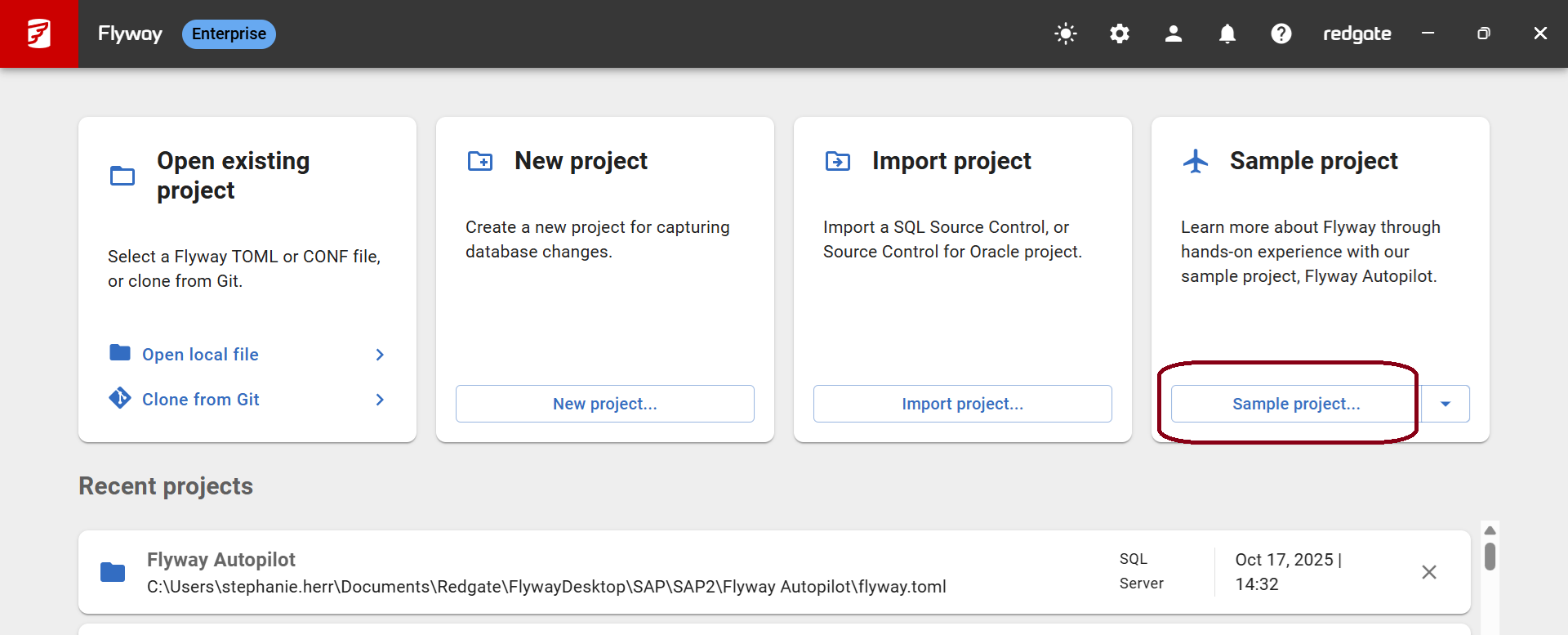
- Try out Flyway with our Flyway Autopilot Sample Project. You can access a guided tour through the Flyway Autopilot sample project in Flyway Desktop:
- Create a new project in Flyway Desktop that goes to a new Git repository/folder. Link your development database or a sample database.
What's next?
- Import your SQL Source Control project to Flyway
- Learn more about:
- How to "Commit Changes" in your development database to version control
- How to "Get Latest" changes from source control and apply these back to your development database - this is needed if you are on a dedicated development database or switching branches
- Deploying - How to deploy changes manually or automatically
Any Questions?
If you have any questions about moving from SQL Source Control to Redgate Flyway Enterprise, please get in touch with our Database DevOps Team.
This documentation contains proprietary information and is protected by copyright law.
Copyright © 2026 Red Gate Software Limited. All rights reserved


