SQL Audit file rollover missed events
Published 10 March 2026
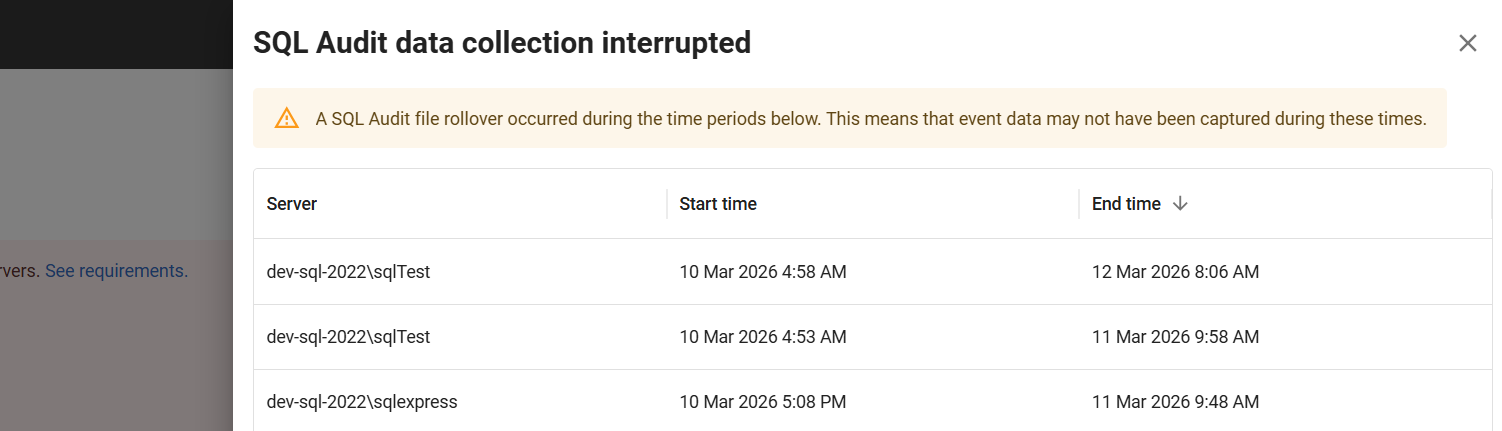
A SQL Audit file rollover is a common occurrence in SQL Server. Still, there can be a case where a surge in Audit events causes a file rollover before Redgate Monitor can sample the audit events in a file that was rolled over. The default sampling frequency is 10 minutes, so the surge should occur within this timeframe. This check is in place to validate such cases. This is surfaced in Redgate Monitor in two ways: a warning, which is mentioned below and, a corresponding alert if activated, which can be seen in the Security Alerts page.
Warning on the SQL Audit page
You will see a warning icon on the "Date" column; when clicked, it opens the list of servers and the date range for which samples were missed.

How to prevent this from happening
To prevent the occurrence or recurrence of this issue, we recommend updating the audit configuration of MAXSIZE and MAX_ROLLOVER_FILES to an appropriate value based on the number of audit events using the scripts mentioned below. The default is set to 100MB and 5 files, which, according to our testing, should be able to store around 50,000 audit records.
For rollover to cause missed events under default conditions, there will need to be over 50,000 audit events in a 10-15 minute window.
Once a rollover occurs, we cannot regain the missed audit events. The next steps would be to take the preventive measures mentioned above.
Configuration changes for SQL audit
To change SQL Audit MAXSIZE and MAX_ROLLOVER_FILES settings, the user needs to disable both audit and audit specification, then they can apply the queries below and re-enable SQL Audit.
USE master;

-- Declare variables
DECLARE @MAXSIZE NVARCHAR(20) = N'100MB'; -- e.g. '100MB', '1GB','UNLIMITED'
DECLARE @MAX_ROLLOVER_FILES INT = 5;

/* Disable spec/audit if they exist */
IF EXISTS
(
    SELECT 1
    FROM sys.server_audit_specifications
    WHERE name = 'RedgateMonitorPermissionsAuditSpec'
)
BEGIN
    ALTER SERVER AUDIT SPECIFICATION [RedgateMonitorPermissionsAuditSpec]
    WITH
    (STATE = OFF);
END;

IF EXISTS
(
    SELECT 1
    FROM sys.server_audits
    WHERE name = 'RedgateMonitorPermissionsAudit'
)
BEGIN
    ALTER SERVER AUDIT [RedgateMonitorPermissionsAudit]
    WITH
    (
        STATE = OFF
    );
END;


DECLARE @sql NVARCHAR(MAX) = N'
ALTER SERVER AUDIT [RedgateMonitorPermissionsAudit]
TO FILE
(
    MAXSIZE = ' + @MAXSIZE + N',
    MAX_ROLLOVER_FILES = ' + CAST(@MAX_ROLLOVER_FILES AS NVARCHAR(20)) + N'
);';
EXEC sys.sp_executesql @sql;

/* Re-enable audit specification and audit */
ALTER SERVER AUDIT SPECIFICATION [RedgateMonitorPermissionsAuditSpec] WITH (STATE = ON);
ALTER SERVER AUDIT [RedgateMonitorPermissionsAudit] WITH (STATE = ON);
GOUSE master;
-- Declare variable
DECLARE @MAXSIZE NVARCHAR(20) = N'2MB'; -- Alter MAXSIZE between 2MB and 50MB
/* Disable spec/audit if they exist */
IF EXISTS
(
SELECT 1
FROM sys.server_audit_specifications
WHERE name = 'RedgateMonitorPermissionsAuditSpec'
)
BEGIN
ALTER SERVER AUDIT SPECIFICATION [RedgateMonitorPermissionsAuditSpec]
WITH
(STATE = OFF);
END;
IF EXISTS
(
SELECT 1
FROM sys.server_audits
WHERE name = 'RedgateMonitorPermissionsAudit'
)
BEGIN
ALTER SERVER AUDIT [RedgateMonitorPermissionsAudit]
WITH
(
STATE = OFF
);
END;
DECLARE @sql NVARCHAR(MAX) = N'
ALTER SERVER AUDIT [RedgateMonitorPermissionsAudit]
TO FILE
(
MAXSIZE = ' + @MAXSIZE + N'
);';
EXEC sys.sp_executesql @sql;
/* Re-enable audit specification and audit */
ALTER SERVER AUDIT SPECIFICATION [RedgateMonitorPermissionsAuditSpec] WITH (STATE = ON);
ALTER SERVER AUDIT [RedgateMonitorPermissionsAudit] WITH (STATE = ON);
GO
To change the SQL Audit MAXSIZE setting on Google Cloud SQL, turn off both the audit and the audit specification, run the query below, then turn SQL Audit back on. Google Cloud SQL requires MAXSIZE to be between 2 MB and 50 MB, and you cannot set MAX_ROLLOVER_FILES.
USE master;

-- Declare variable
DECLARE @MAXSIZE NVARCHAR(20) = N'2MB'; -- Alter MAXSIZE between 2MB and 50MB

/* Disable spec/audit if they exist */
IF EXISTS
(
    SELECT 1
    FROM sys.server_audit_specifications
    WHERE name = 'RedgateMonitorPermissionsAuditSpec'
)
BEGIN
    ALTER SERVER AUDIT SPECIFICATION [RedgateMonitorPermissionsAuditSpec]
    WITH
    (STATE = OFF);
END;

IF EXISTS
(
    SELECT 1
    FROM sys.server_audits
    WHERE name = 'RedgateMonitorPermissionsAudit'
)
BEGIN
    ALTER SERVER AUDIT [RedgateMonitorPermissionsAudit]
    WITH
    (
        STATE = OFF
    );
END;

DECLARE @sql NVARCHAR(MAX) = N'
ALTER SERVER AUDIT [RedgateMonitorPermissionsAudit]
TO FILE
(
    MAXSIZE = ' + @MAXSIZE + N'
);';
EXEC sys.sp_executesql @sql;

/* Re-enable audit specification and audit */
ALTER SERVER AUDIT SPECIFICATION [RedgateMonitorPermissionsAuditSpec] WITH (STATE = ON);
ALTER SERVER AUDIT [RedgateMonitorPermissionsAudit] WITH (STATE = ON);
GOThis documentation contains proprietary information and is protected by copyright law.
Copyright © 2026 Red Gate Software Limited. All rights reserved


