Scheduling restore jobs > Select destination server and backups to restore > Select destination database > Specify file locations > Specify verification options > Configure restore options > Create restore schedule > Review summary
On step 4 of the wizard, select verification options for the restored database.
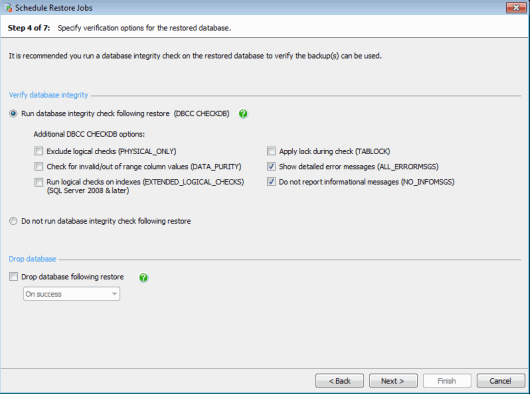
Verifying database integrity
Run database integrity check following restore (DBCC CHECKDB) is selected by default. A database integrity check verifies the logical and physical integrity of all the objects in the restored database. The command is included within the SQL Backup restore job.
Verifying backup files by restoring the database and checking its integrity is a recommended step in any disaster recovery plan. The results of the database integrity check are displayed in the Activity History and detailed in the log file.
You can add additional options to the integrity check, as follows:
- Exclude logical checks (PHYSICAL_ONLY) Limit the check to the physical integrity of the database, reducing the time required to complete the check. This option is not available if Check for invalid/out of range column values or Run logical checks on indexes is selected.
- Check for invalid/out of range column values (DATA_PURITY) This option is not available if Exclude logical checks is selected. If the database was created in SQL Server 2005 or later, column values will be checked by default and there is no need to include this option.
- Run logical checks on indexes (EXTENDED_LOGICAL_CHECKS) (SQL Server 2008 and later.) Perform additional logical checks on indexes. Running these checks can have a significant impact on performance. This option is not available if Exclude logical checks is selected.
- Apply lock during check (TABLOCK) Obtain a lock on the database while the integrity check is performed. This includes a temporary exclusive lock which will prevent concurrent access to the database. Selecting this option reduces the time required to perform the integrity check.
- Show detailed error messages (ALL_ERRORMSGS) Show all error messages for each object.
- Do not report informational messages (NO_INFOMSGS) If no additional options are selected, no informational messages will be returned and the option is disabled.
Refer to your SQL Server documentation for more information about the DBCC CHECKDB command and additional options.
Dropping a database
You can specify that the database should be dropped as part of the restore job. This will remove the database from the SQL Server instance and delete the physical files used by the database.
- Select On success with Run database integrity check following restore to drop the database only after the restore and the database integrity check have both completed successfully.
- Select On success with Do not run database integrity check following restore to drop the database once the restore has completed successfully.
- Select Always to drop the database once the restore and integrity check (if selected) have been performed, regardless of whether they have completed successfully.
Note: dropping the restored database will not delete the backup file. You can specify when a backup should be deleted using the Back Up wizard or Schedule Backup Jobs wizard.
Next: configure restore options