Known Issues
Published 11 September 2025
Getting "Oops, we've got a problem" screen?
Some of our users reported that they were getting "Oops, we've got a problem" screen when trying to open any of their models in Chrome browser.
We found out that in most cases the problem was caused by an ad-blocking extensions.
The solution for this is to add Redgate Data Modeler to the allow list of domains in your ad blocker.
If the problem persists, try turning it off completely, and if this doesn't help, contact Redgate support.
Export as image button does not work. What should I do?
The image is generated as a pop-up window. If you can't see the image it's likely that your browser has blocked the pop-up window. For the generation to work make sure that your browser allows Redgate Data Modeler to open pop-up windows. Ad-blocking extensions can also interfere with this, so it's recommended to disable them if you experience this issue.
Reverse Engineering a database using SSMS truncates the XML output
When running the DBClient XML script in SSMS, if the database is large the XML output maybe truncated without you knowing. When you paste the XML results into the window you will be informed that the XML format is not valid. To resolve this change the setting: Tools > Options > Query Results > SQL Server > Results to grid > Maximum characters retrieved Non XML Data to 999999999. 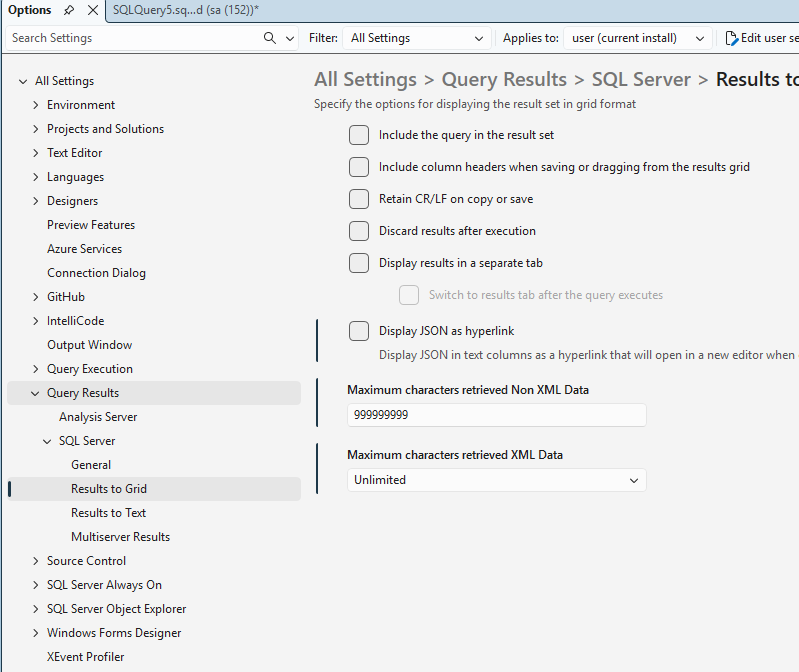
This documentation contains proprietary information and is protected by copyright law.
Copyright © 2026 Red Gate Software Limited. All rights reserved


