SQL Search doesn't appear in the Redgate toolbar
Published 10 October 2017
Sometimes, after upgrading SQL Search (or a bundle of products that contains SQL Search), SQL Search will disappear from the Redgate toolbar in SQL Server Management Studio.
This can sometimes be fixed by repairing the SIP Framework installation:
- Open Programs and Features.
Right-click SSMS Integration Pack Framework 1 and select Repair.
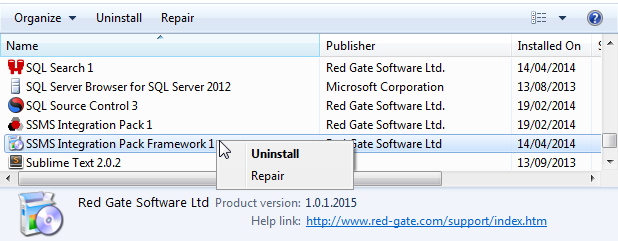
You should now be able to access SQL Search normally.
This documentation contains proprietary information and is protected by copyright law.
Copyright © 2026 Red Gate Software Limited. All rights reserved


