Backups
Published 28 March 2024
The backups page shows you an overview of your estate's backup history as well as allowing for detailed drill down. Currently, the Backups page shows data for SQL Server and Postgres instances only. For detailed information on each, go to:
Recovery Point Objective
The recovery point objective (RPO) is the time since the last successful backup. It shows how much data you would lose if a failure occurred.
The RPO graph shows how many databases or instances have an RPO in each band of time.
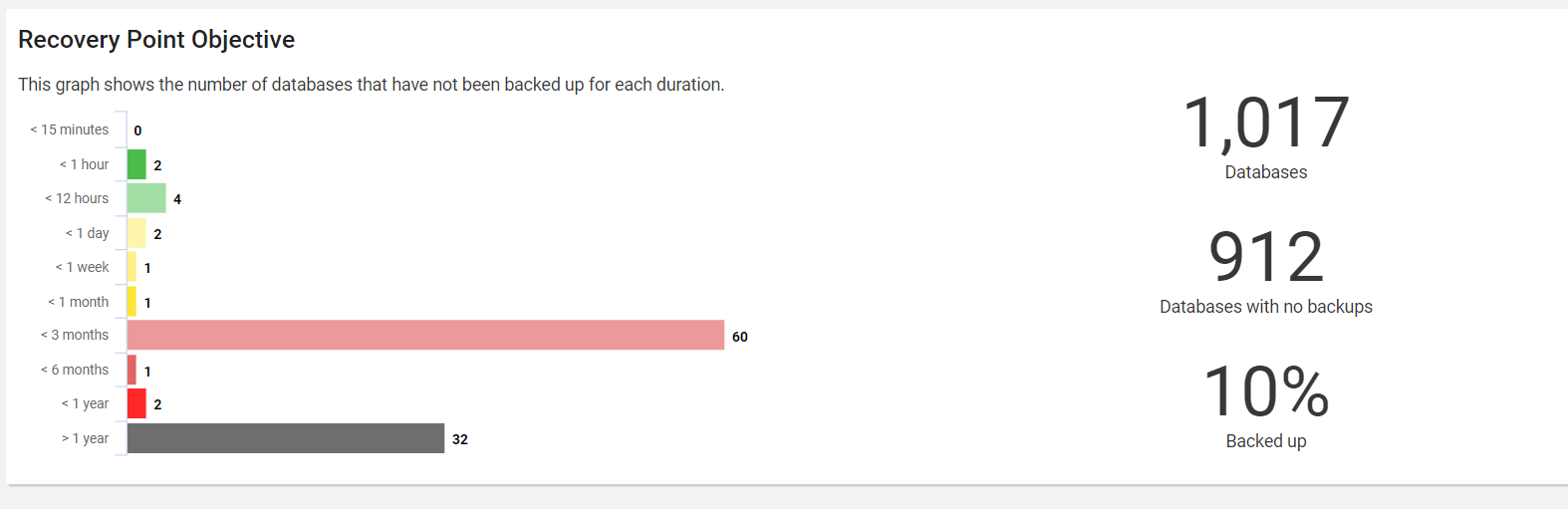
Recovery Point Bands
Both SQL Server and Postgres backups pages use these bands:
- < 15 minutes
- < 1 hour
- < 12 hours
- < 1 day
- < 1 week
- < 1 month
- < 3 months
- < 6 months
- < 1 year
- > 1 year
The colors go from green for recent backups, through yellow, to red for old backups.
How the tabs differ
| SQL Server | Postgres | |
|---|---|---|
| Unit counted in the RPO graph | Database | Instance |
| Row in the grid | Database | Backup set, such as PgBackRest stanza |
| Source of backup data | SQL Server backup history | The backup tool. Only pgBackRest is supported. |
| Not shown on page | Azure SQL Database Hyperscale databases | Cloud-managed instances |
For more details, see the page for each database engine.
This documentation contains proprietary information and is protected by copyright law.
Copyright © 2026 Red Gate Software Limited. All rights reserved


