How is it different from self-hosted Redgate Monitor?
Published 13 February 2026
While for the most part the SaaS version of Redgate Monitor does not differ from the Self Hosted version there are some things worth noting.
Deployment
Self-Hosted: You are responsible for the deployment of the Monitor Web Service and Base Monitor on your own hardware. You are responsible for hosting a SQL Server or TimescaleDB database which Monitor uses for storage of monitoring data.
SaaS: We (Redgate) are responsible for hosting and managing the Monitor Web Service and Base Monitor for you. In addition, we will host the database required for the storage of monitoring data. We use TimescaleDB as the storage solution. The only component you are responsible for is deploying one or more Agents used to monitor your databases. The monitoring data from your Agents is then sent to our cloud for processing and storage.
Configuration Page
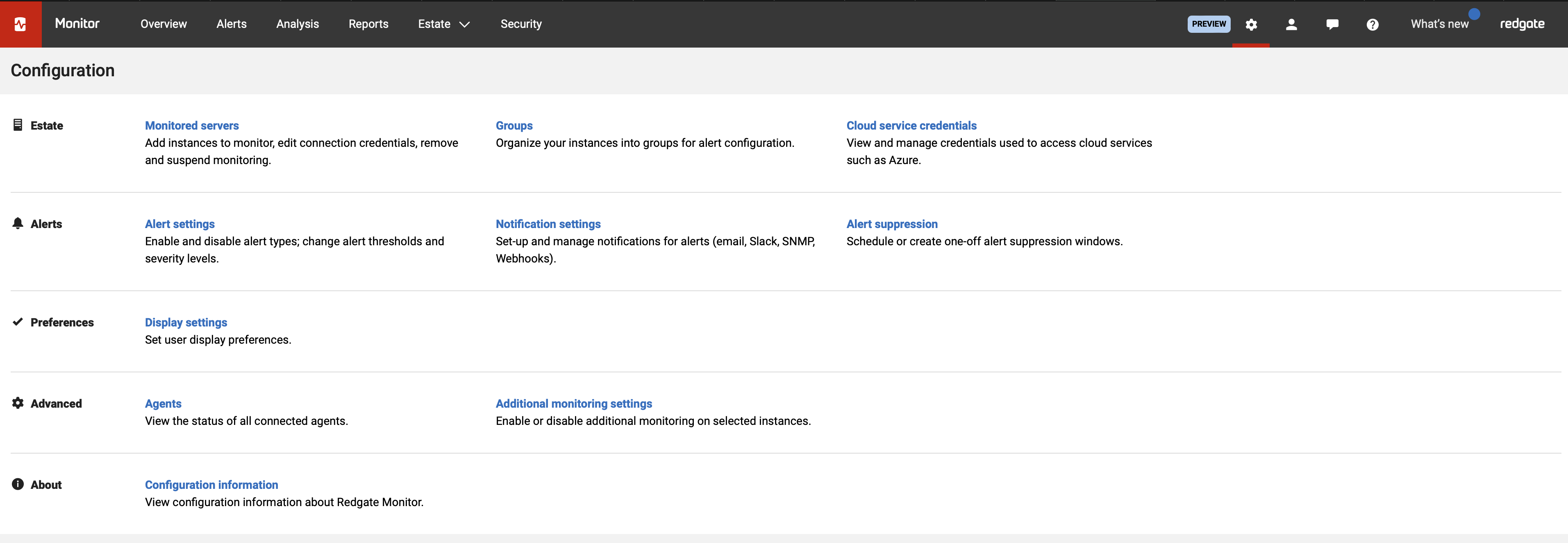
There are fewer settings for you to manage in Monitor SaaS. Settings which we manage for you are not visible on the Configuration Page. You still control which servers you want to monitor, how you want to receive alerts and your display preferences, however we don't allow configuration of items such as retention settings, which are set to the defaults.
Number of databases you can monitor
We currently supported upto the equivalent of 100 monitored instances, we will be further raising this limit later this year.
Features currently not available in Monitor SaaS
The following features are currently not available, as a general principle we aim for the SaaS version to be at least functionally equivalent to the self-hosted version and expect to close many of the below soon.
- Current Activity view is not available
- Custom metrics are not available
- The powershell API and script notifications are not available
- You cannot use SSH keys for connecting to and monitoring Linux servers
- Disk usage information is currently unavailable
- PDF generation is currently unavailable
- Top Query/Top Procedure search has limited functionality due to indexes reseting during each deployment (Weekly)
- The REST API (Enterprise feature) is not available
- Sensitive action log (Enterprise feature) is currently not available
- Configuring Send From Email address for email notifications is not supported
- VMware monitoring is not available
- SQL Profiler trace is not available
This documentation contains proprietary information and is protected by copyright law.
Copyright © 2026 Red Gate Software Limited. All rights reserved


