Setting up PostgreSQL backup monitoring
Published 07 October 2026
Redgate Monitor shows the backups of your PostgreSQL instances on Estate > Backups > PostgreSQL. For each instance, it shows the backup sets, the destinations and the backup history.
Redgate Monitor does not take backups. It reads the backup catalogue of the backup tool that you already use. To give Redgate Monitor access to the catalogue, you create one collection function on each monitored instance. Redgate Monitor calls this function through its usual PostgreSQL connection. It installs nothing on the host.
Supported backup tools
To see the backup tools we support for PostgreSQL instances, please see Backups for PostgreSQL.
How Redgate Monitor finds your backups
- Redgate Monitor reads
archive_commandto find out which backup tool archives the WAL of the instance. - Redgate Monitor looks for the collection function of that backup tool, in the database that it connects to.
- Redgate Monitor calls the function. The function asks the backup tool for its catalogue and returns it.
Requirements
- Your PostgreSQL instance is self-managed. Redgate Monitor does not collect backups from Amazon RDS and Aurora, Azure Database for PostgreSQL flexible server or Google Cloud SQL.
- Redgate Monitor already monitors the instance.
- You have superuser credentials to hand.
pgBackRest
- pgBackRest is installed on the PostgreSQL host
- A stanza for the instance exists, and pgBackRest takes backups of it
archive_commandcallspgbackrestand includes the given stanza
Setting up pgBackRest backup monitoring
Do these steps on each monitored instance.
1. Find the database and role that Redgate Monitor uses
In Redgate Monitor, go to Configuration > Monitored servers, find the instance, and open its connection settings. Write down:
- the Login Database. You create the collection function in this database. It is not always
postgres. - the Database User. This is the monitoring role. You give it permission to run the collection function.
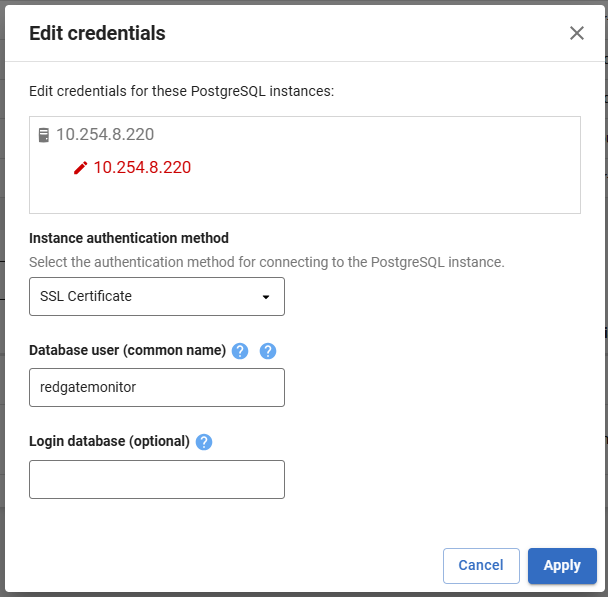
Note: If Login database is empty, Redgate Monitor connects to the database with the same name as the user. For example, if the user is redgatemonitor , create the collection function in the redgatemonitor database.
2. Create the collection function
As a superuser, run this SQL in the database from step 1. Replace <monitoring role> with the user from step 1. Do not change the function name or schema. Redgate Monitor looks for public.rgm_pgbackrest_info() only.
Why the function is safe
The function runs with the rights of the superuser that created it, and it runs pgbackrest as the operating system user that runs PostgreSQL. This user already runs pgBackRest through archive_command . The command in the function is fixed, and the monitoring role cannot pass arguments to it. The script does not give the monitoring role pg_execute_server_program . It gives EXECUTE on this one function only. If archive_command includes --stanza= , the function reads only that stanza.
CREATE OR REPLACE FUNCTION public.rgm_pgbackrest_info()
RETURNS text
LANGUAGE plpgsql
SECURITY DEFINER
SET search_path = pg_catalog, pg_temp
AS $fn$
DECLARE
    stanza text;
    cmd text;
    result text;
BEGIN
    SELECT substring(setting FROM '--stanza=([A-Za-z0-9_.-]+)')
      INTO stanza
      FROM pg_catalog.pg_settings
     WHERE name = 'archive_command';

    IF stanza IS NULL THEN
        cmd = 'pgbackrest --output=json info';
    ELSE
        cmd = 'pgbackrest --stanza=' || stanza || ' --output=json info';
    END IF;

    CREATE TEMP TABLE IF NOT EXISTS _rgm_pgbackrest (line text);
    TRUNCATE _rgm_pgbackrest;
    EXECUTE format('COPY _rgm_pgbackrest FROM PROGRAM %L WITH (FORMAT csv, DELIMITER E''\x01'', QUOTE E''\x02'')', cmd);
    SELECT string_agg(line, '') INTO result FROM _rgm_pgbackrest;
    RETURN result;
END;
$fn$;

REVOKE ALL ON FUNCTION public.rgm_pgbackrest_info() FROM PUBLIC;
GRANT EXECUTE ON FUNCTION public.rgm_pgbackrest_info() TO <monitoring role>;
3. Check the collection function
Execute the collection function as the monitoring role, in the database from step 1:
sudo -u postgres psql -p <port> -d <database> -At <<'EOF'
SET ROLE <monitoring role>;
SELECT has_function_privilege('public.rgm_pgbackrest_info()', 'EXECUTE');
SELECT left(public.rgm_pgbackrest_info(), 200);
EOF
The result must be:
- First line:
t. - Second line: JSON that starts with
[{"archive":.
4. Check Redgate Monitor
Go to Estate > Backups > PostgreSQL. The instance shows its backup sets, destinations and backup history within 10 minutes. If it does not, see the Troubleshooting section below.
Troubleshooting
An instance with no backup set shows a message on Estate > Backups > PostgreSQL. The message gives the reason.
"WAL archiving is turned off on this instance"
archive_mode is off, or archive_command is not set. Turn on WAL archiving through your backup tool.
"Redgate Monitor does not recognize a backup tool in the archive_command of this instance"
Redgate Monitor does not recognize the command in archive_command, for example because it runs a wrapper script. Call the backup tool directly in archive_command.
"This instance takes backups with <backup tool>. Redgate Monitor currently reads backups from ... only"
Redgate Monitor recognizes the backup tool, but it cannot read backups from it yet. See Supported backup tools.
"<Backup tool> is configured, but Redgate Monitor cannot read its backups"
archive_command calls a supported backup tool, but Redgate Monitor cannot read the backups.
| Cause | Check | Fix |
|---|---|---|
| The collection function is in a different database. | Compare the Login database in the connection settings with the database where you created the function. If Login database is empty, compare the user name instead. | Create the function in the login database. |
| The monitoring role cannot run the collection function. | Step 3: the first line is f. | Run the GRANT EXECUTE line again, with the correct role. |
| A superuser does not own the collection function. | Step 3: the second SELECT fails with a permission error. | Create the function again as a superuser. |
| Redgate Monitor has not collected the data yet. | Less than 10 minutes since you created the function. | Wait at least 10 minutes after the function has been created. |
| pgBackRest only: the stanza is for a different cluster. | Check pg1-path and pg1-port for the stanza in pgbackrest.conf. | Point the stanza at this cluster. |
See also
This documentation contains proprietary information and is protected by copyright law.
Copyright © 2026 Red Gate Software Limited. All rights reserved


