Backups for PostgreSQL
Published 05 October 2026
The PostgreSQL tab of the Backups page shows the backup history of your monitored PostgreSQL instances. Use it to find instances that are not backed up often enough, and to see how much data you could lose if an instance failed.
Cloud-managed instances, such as Amazon RDS, Azure Database for PostgreSQL Flexible Server and Google Cloud SQL, are not shown on this tab.
For information that applies to all database engines, such as the recovery point bands, see Backups.
Supported backup tools
Redgate Monitor reads backups from pgBackRest.
Redgate Monitor finds the backup tool of an instance from its archive_command setting. It recognizes these tools:
| Backup tool | Redgate Monitor reads its backups |
|---|---|
| pgBackRest | Yes |
| Barman | No* |
| WAL-G | No* |
| pg_probackup | No* |
* If you use a backup tool that Redgate Monitor does not read yet, tell us which tool you use.
If an instance uses a tool that Redgate Monitor does not read yet, or a custom archive_command script, the tab shows the instance but cannot check its backups. See [Instances with no backup set](#instances-with-no-backup-set).
Redgate Monitor reads pgBackRest backups when the [collection function](#set-up-backup-collection-for-pgbackrest) is installed, even if archive_command runs a custom script that calls pgBackRest.
Redgate Monitor does not detect other backups, such as pg_dump , pg_basebackup or pg_probackup backups, or volume snapshots.
Backup sets
A backup set is the unit that your backup tool backs up as one thing. For PostgreSQL this is normally the whole instance. A physical backup copies the data directory and archives the write-ahead log (WAL), and both cover every database in the instance.
Each backup tool has its own name for a backup set:
| Backup tool | Name for a backup set | Where is it set |
|---|---|---|
| pgBackRest | Stanza | the --stanza option in archive_command |
An instance normally has one backup set. To keep more than one copy of its backups, such as a local copy and an offsite copy, give the backup set more than one destination.
Recovery Point Objective (RPO)
The RPO graph shows the number of instances in each band of time since their last backup.
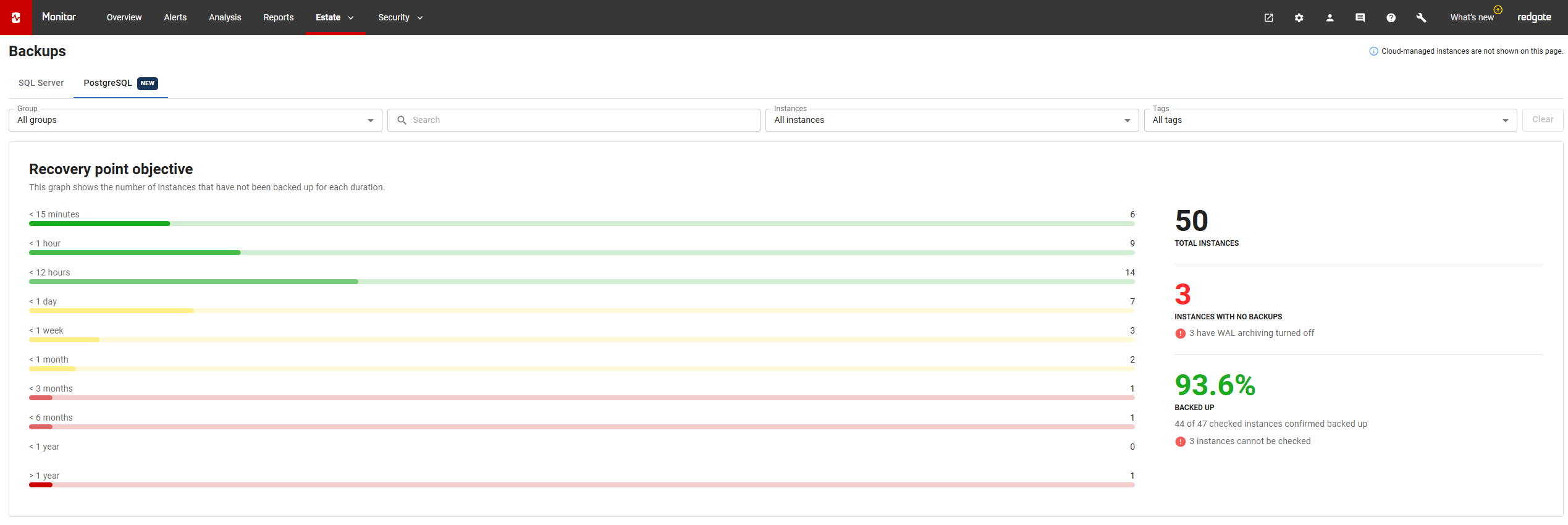
How Redgate Monitor calculates the RPO of an instance
The graph counts instances, not databases or backup sets. The RPO of an instance is the time since the most recent backup of any of its backup sets. This is the latest point that you can restore the instance to.
Summary statistics
| Statistic | What it shows |
|---|---|
| Total instances | The number of instances that the current filters show. |
| Instances with no backups | The number of checked instances that have no backups. This includes instances with WAL archiving turned off. |
| Backed up | The percentage of checked instances that have at least one backup. |
Instances that cannot be checked
Redgate Monitor cannot check the backups of some instances. For example, an instance that uses a backup tool that Redgate Monitor does not support yet. These instances may or may not have backups.
The summary does not include these instances in the bands or in the Backed up percentage. It shows the number of these instances, and an icon. Hover over the icon to see why the instances cannot be checked.
Backup history retention
An instance has "no backups" when Redgate Monitor has no backup history for it. Redgate Monitor keeps the backup history of PostgreSQL instances for the time that you set for Basic instance data in the data retention settings. The Backup history setting applies to SQL Server only.
To change the retention time, go to Configuration > Data management > Data retention. See Setting Redgate Monitor data retention policy.
Backup overview
The backup overview shows each backup set, under its group and instance, with its most recent full, differential and incremental backups on record.
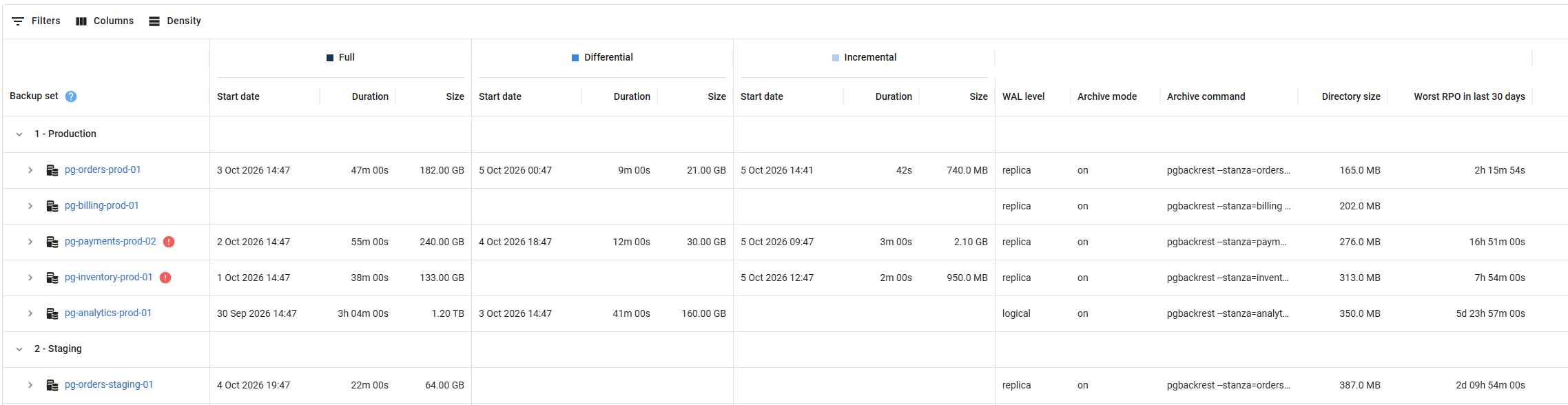
Backup details
Expand a backup set to see its errors, its destinations and its backup history.
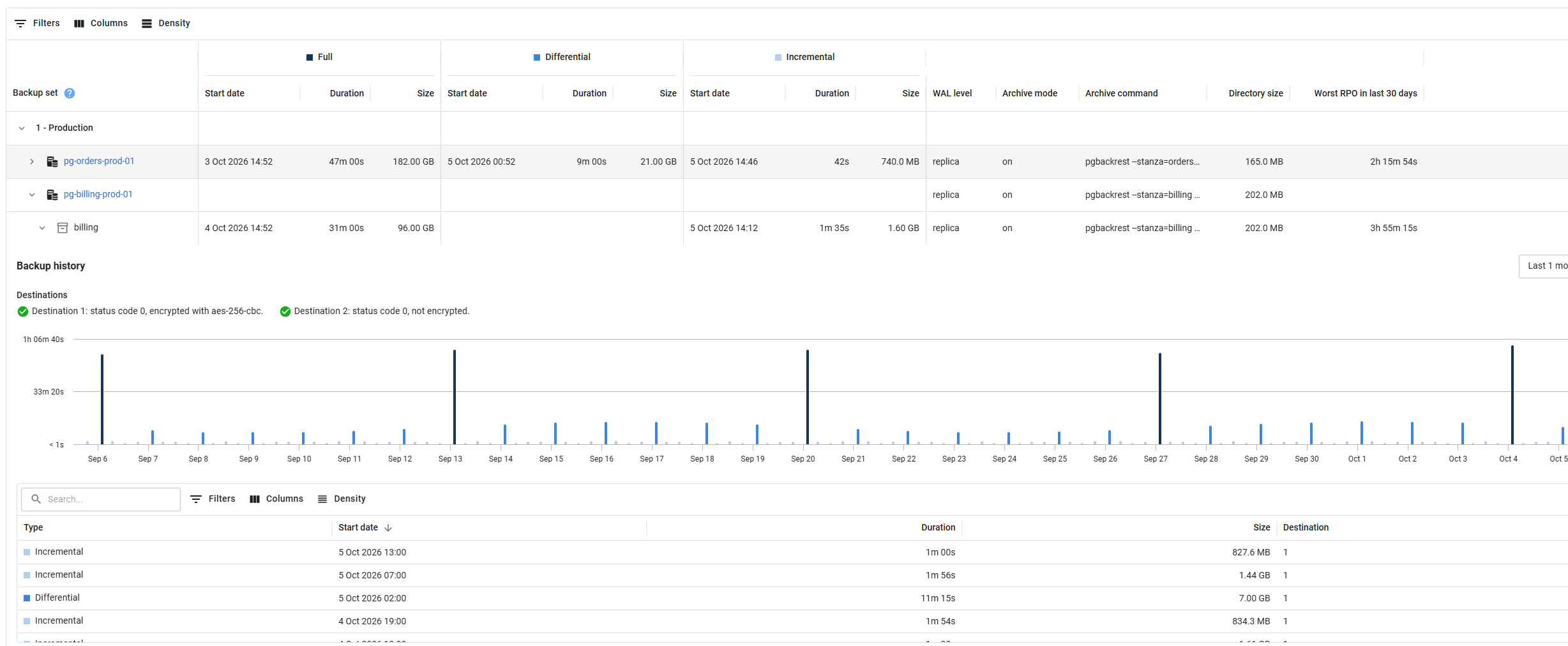
Warnings
The overview shows an error icon on a backup set that has a problem. Hover over the icon to see the problem. Expand the backup set to see all of its errors.
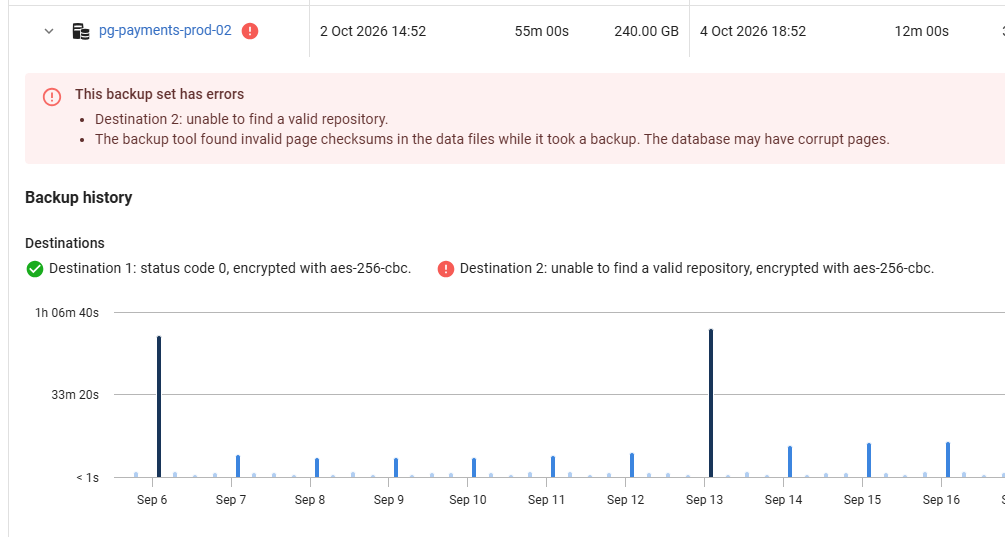
Destinations
A destination is a place where the backup tool stores backups, such as a local disk, a remote host or cloud storage. A backup set can have more than one destination. Each destination holds its own backups.
Each backup tool has its own name for a destination:
| Backup tool | Name for a destination | Where is it set? |
|---|---|---|
| pgBackRest | Repository | The repo1 , repo2 (and so on) options |
The details list each destination of the backup set. For each destination, the list shows if it is healthy or has an error, and if the backup tool encrypts it.
This documentation contains proprietary information and is protected by copyright law.
Copyright © 2026 Red Gate Software Limited. All rights reserved


