If you have installed any previous version of SQL Clone, you can ensure it's fully removed by:
The majority of SQL Clone installation issues occur because the OS does not have the latest updates.
Install the latest OS updates, and check the requirements and limitations pages to ensure your system is compatible before proceeding.
This can also mean a service with that name already exists. Ensure any previous SQL Clone installations are removed, and try again.
Ensure your system is 64-bit, there are no plans to support 32-bit operating systems.
This usually happens when the installed service cannot start. Check the Application section of the Windows Event Viewer for extra information.
SQL Clone serves a web app accessible in your browser at: http://machinename:14145
Someone in your organization should be able to tell you the relevant machine name where the SQL Clone Server is installed.
When the SQL Clone Agent installation fails, you might see an error among Windows Application Event Logs, which is similar to below one:
System.Net.Http.HttpRequestException: An error occurred while sending the request. ---> System.Net.WebException: The underlying connection was closed: An unexpected error occurred on a send. ---> System.IO.IOException: Unable to read data from the transport connection: An existing connection was forcibly closed by the remote host. ---> System.Net.Sockets.SocketException: An existing connection was forcibly closed by the remote host at System.Net.Sockets.Socket.EndReceive(IAsyncResult asyncResult) at System.Net.Sockets.NetworkStream.EndRead(IAsyncResult asyncResult) --- End of inner exception stack trace --- at System.Net.TlsStream.EndWrite(IAsyncResult asyncResult) at System.Net.ConnectStream.WriteHeadersCallback(IAsyncResult ar) --- End of inner exception stack trace --- at System.Net.HttpWebRequest.EndGetRequestStream(IAsyncResult asyncResult, TransportContext& context) at System.Net.Http.HttpClientHandler.GetRequestStreamCallback(IAsyncResult ar) --- End of inner exception stack trace --- at System.Runtime.CompilerServices.TaskAwaiter.ThrowForNonSuccess(Task task) at System.Runtime.CompilerServices.TaskAwaiter.HandleNonSuccessAndDebuggerNotification(Task task) at RedGate.SqlClone.Agent.ManagementServiceClient.JsonHttpClient.<Post>d__5`2.MoveNext() --- End of stack trace from previous location where exception was thrown --- at System.Runtime.CompilerServices.TaskAwaiter.ThrowForNonSuccess(Task task) at System.Runtime.CompilerServices.TaskAwaiter.HandleNonSuccessAndDebuggerNotification(Task task) at RedGate.SqlClone.Agent.ManagementServiceClient.RegistrationClient.<Register>d__2.MoveNext() |
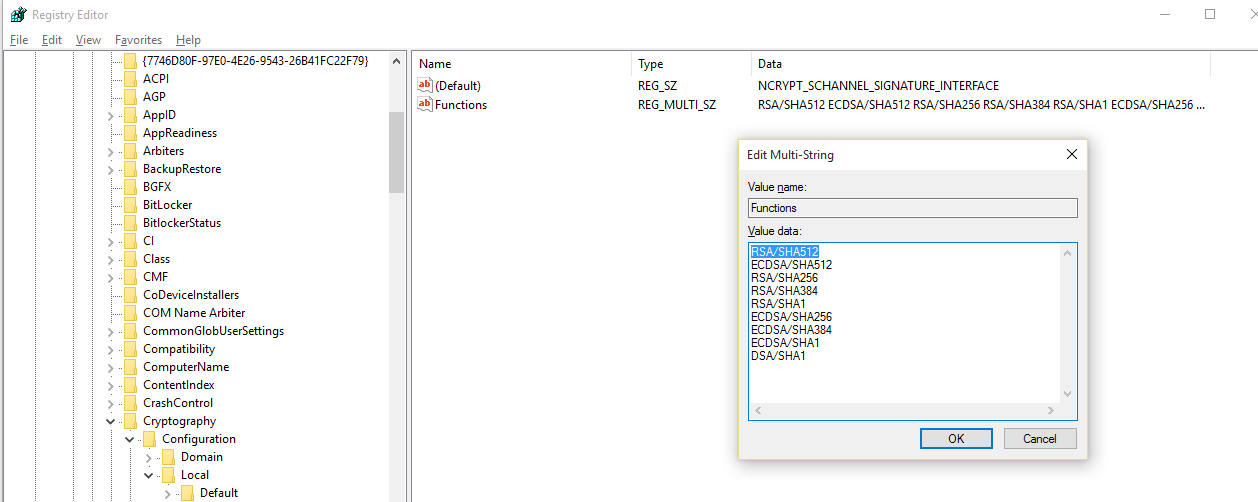
This error may occur when SHA512 is disabled in Windows when you use TLS 1.2 on the machine where you are trying to install the SQL Clone Agent on. You can check whether this is the case by looking at the "HKEY_LOCAL_MACHINE\SYSTEM\CurrentControlSet\Control\Cryptography\Configuration\Local\SSL\00010003" REG_MULTI_SZ registry value and see if you can see "RSA/SHA512" there like you do in below image:
When the SQL Clone Agent installation fails, you might see an error among Windows Application Event Logs, which is similar to below one:
System.IO.FileNotFoundException: Could not load file or assembly 'RedGate.SqlClone.Unmanaged.dll' or one of its dependencies. The specified module could not be found. File name: 'RedGate.SqlClone.Unmanaged.dll' at RedGate.SqlClone.Agent.Service.SqlCloneSetup.InitializeAgent() at RedGate.SqlClone.Agent.Service.RegisteredAgentLifetime.CreateRegisteredAgentLifetime(AgentSettings settings, X509Certificate2 certificate, CancellationTokenSource cancellationTokenSource, ILogger logger, Boolean retryRegistration) at RedGate.SqlClone.Agent.Service.AgentServiceTask.<>c__DisplayClass8_0.<RegisterAndStartAsync>b__0() at System.Threading.Tasks.Task`1.InnerInvoke() at System.Threading.Tasks.Task.Execute() --- End of stack trace from previous location where exception was thrown --- at System.Runtime.CompilerServices.TaskAwaiter.ThrowForNonSuccess(Task task) at System.Runtime.CompilerServices.TaskAwaiter.HandleNonSuccessAndDebuggerNotification(Task task) at RedGate.SqlClone.Agent.Service.... |
This can happen when Microsoft Visual C++ 2015 Redistributable (x64) is not installed correctly on the machine. SQL Clone Agent installer currently tries to install this dependency if it's not already there. However, the installation is not performed correctly when you do not have KB2919355 installed. KB2919355 also requires KB2919442 installed prior to installing it. In order to fix this issue, you need to follow the below steps in given order:
Ensure the image destination you chose has more free space than the size of your database, and ensure the disk is defragmented.
If you are running on Windows 7/Windows Server 2008 R2, this problem can also occur when creating images to a network path which is on the same machine as the agent creating the image. This should be fixed in a subsequent release. A workaround at the moment is to use a network location which is on a different machine. You can also specify a local path, but this will prevent you from sharing images to other machines successfully.
Unfortunately, we don't currently have a way to clear out the failed items on the Web UI. However, we are aware of this restrictions and it's on our backlog to get it done. As a workaround, you can run the below update command against our config database. it will mark those failed images as deleted. Please make sure that the database name reflects the database name that you configured it to. It's "SQLClone_Config" by default.
UPDATE [SQLClone_Config].[dbo].[Images] SET [State] = 4, DeletedOn = GETUTCDATE() WHERE [State] = 6 AND DeletedOn IS NULL; |