Running an anonymization treatment
Published 27 November 2025
Prerequisites
You've created and configured your treatment
Link to: Creating an Anonymization Treatment
Running an Anonymization Treatment
Step 1: Start the Treatment
- Click Run Anonymize in the top-right corner
- The "Run treatment" panel appears
Step 2: Select Target Database
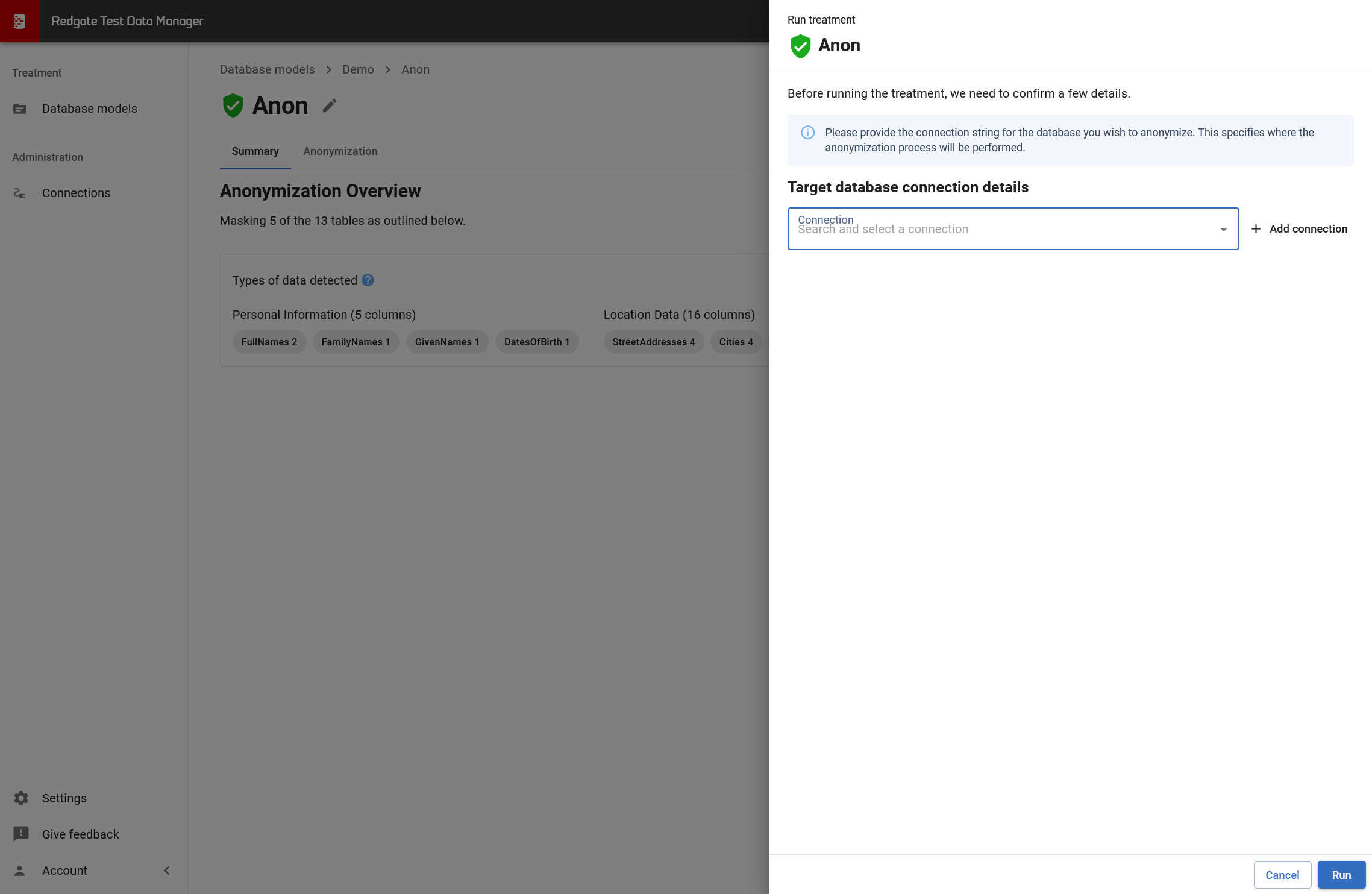
Target database connection details:
- Select an existing connection from the dropdown, OR
- Click + Add connection to create a new connection
Can I run this on a different database? Yes! You can run the treatment against any database with the same schema as the model. This is useful for anonymizing multiple copies of the same database (e.g., dev, test, staging environments).
Anonymization modifies data: The treatment will replace data in the target database. Make sure you're connecting to a non-production database.
Step 3: Run the Treatment
- Review the connection details
- Click Run
- Monitor progress
What Happens During Execution
- TDM connects to target database
- Applies masking rules
- Progress shown in UI
Related Pages
← Back to Reviewing and Editing Masking Rules
→ Download Treatment for CLI Use
→ Anonymization Troubleshooting
This documentation contains proprietary information and is protected by copyright law.
Copyright © 2026 Red Gate Software Limited. All rights reserved


