These pages cover SQL Backup Pro 8.0. Help for older versions is also available.

-
Created by
 Administrator, last updated by David Connell on Jun 21, 2016
2 minute read
Administrator, last updated by David Connell on Jun 21, 2016
2 minute read
SQL Backup Pro can send an email to specified addresses whenever there are errors or warnings, or only if an error occurs, or for any outcome (success or failure).
To make this option available, you must enter the email settings to be used. You can then specify the recipients of the email when you set up the backup or restore operation:
- In the graphical user interface, you specify the email addresses in the back up, scheduled backup, restore, scheduled restore or log shipping wizard
- When scripting a SQL Backup Pro job, you use the
BACKUPandRESTOREcommand optionsMAILTO,MAILTO_ONERROR, andMAILTO_ONERRORONLY. For more information see The BACKUP command and The RESTORE command.
In order to send the notification email, the server on which SQL Backup Pro is installed must be set up to relay email to your mail server.
To edit the email notification options for a SQL Server:
- Select the SQL Server on the Registered SQL Servers pane.
- On the Tools menu, select Server Options.
In the Server Options dialog box, select the Email Settings tab.
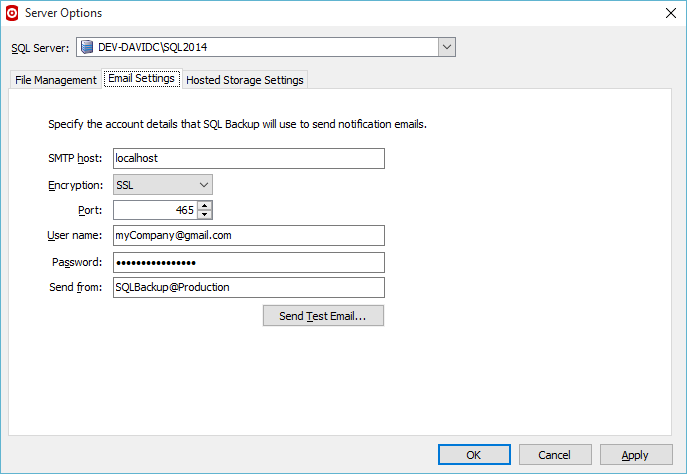
- In the SMTP host box, type the name of the SMTP server that SQL Backup Pro is to use when sending emails, and in the Port box, type or select the number of the port on the SMTP server (defaults to 25).
- If your server requires Encryption, select either SSL or TLS in Encryption, then type appropriate port address in the Port box.
- If your server requires authentication, type the user name in User name, then type your password in the Password box. The account must have permission to send email.
- In the Send from box, type the email address from whom the email will be sent.
If you leave this blank, SQL Backup Pro will use the default email address for the sender: SQLBackup@ComputerName. - To send a test email to ensure your settings are correct, click Send Test Email, and enter an email address for the recipient. When you click OK, the test email is sent.
Overview
Content Tools
- Printed by Atlassian Confluence 10.2.19