[SQL Clone home]
These pages cover SQL Clone Technical Preview 0.2 to 0.3, which is not the latest version. Help for other versions is also available.

- To install Redgate SQL Clone, run the Instant Clone installer MSI.
- SQL Clone is installed into "%programfiles(x86)%\Red Gate\Instant Clone Preview" and as a Start Menu item.
- SQL Clone should be installed on any machine on which you want to do cloning operations: Creating snapshot, cloning snapshots, etc.
- If you want to just use a cloned database, you do not need to install it on that machine.
- The installer will prompt you for a service account for the SQL Clone service:
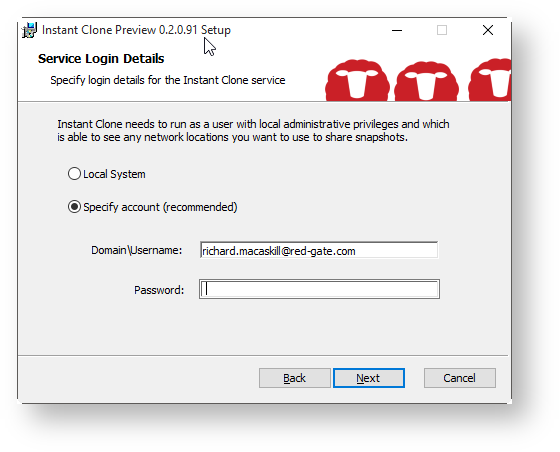
- This account needs to have rights to Logon As A Service, Disk Management, and also SQL Server rights for your local instance (if you are using Windows Authentication) - CREATE DATABASE and VIEW ANY DEFINITION.
When the installer has completed, the UI will launch (by default), and you can continue by following the Getting Started guide in the Using the UI section.
Overview
Content Tools
- Printed by Atlassian Confluence 8.5.31