Quickstart - Flyway CLI
Published 17 July 2024
Flyway Pipelines is now Flyway Insights. Read our blog to find out more details. These documentation pages will be updated soon. You can access Flyway Insights and see sample data at https://flyway.redgate.com.
The easiest way to experience the Flyway Service is using Flyway CLI.
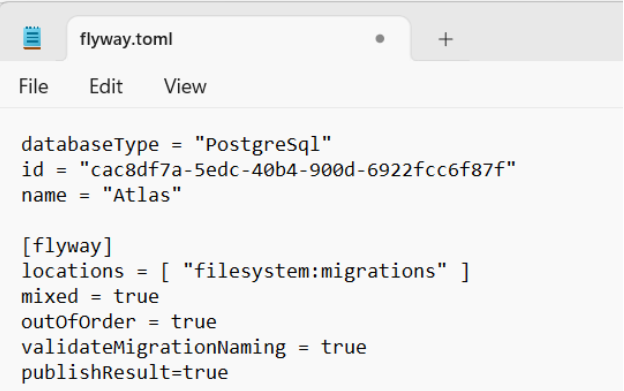
- Configure your Flyway project by adding a databasetype, id and name at the top of your project's flyway.toml file.
databaseType = "PostgreSql"
id = "InsertGUIDhere"
name = "ProjectNameHere"
- You can generate a guid here: Online GUID Generator (encrypt-online.com)
- The conf/flyway.toml can be found in your Flyway project folder.
- Save the file.
Note: The service does not currently work with flyway.conf files this is something we are working on resolving, please contact adam.britt@red-gate.com if this is something you require. To use the service now learn how to convert a conf file to a TOML file here
2. Authenticate with Flyway CLI
- To use the Flyway Service you will need to authenticate Flyway CLI so that it can communicate with the Redgate Hosted Service.
- To do this run the following command on Flyway CLI
flyway auth -IAgreeToTheEula

3. Publishing insights to the Flyway Service
- To see your deployment event being published to the service all you need to to is to deploy a migration script to a target of your choice using the following CLI parameters.
- Ensure that you have at least one pending migration script
- Run the following commands on your target environment
flyway migrate -url=InsertEnvironmentUrlHere -user=InsertUserNameHere -password=*** -publishResult=true -checkDriftOnMigrate=true -environment=InsertEnvironmentNameHere

4. Viewing your deployments in the Flyway Service
The flyway migrate operation has now published its results to the Flyway Service. Simply visit https://flyway.red-gate.com/ to open the pipeline dashboard view.

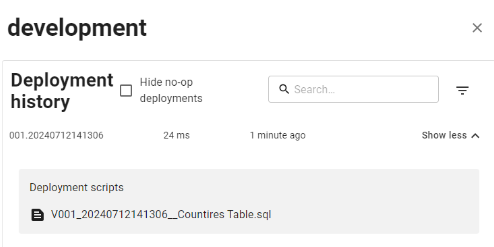
You can drill down to to view any environments that have deployments registered against them for a specific Flyway project.

Use show more to view the detailed deployment history for an environment.
This documentation contains proprietary information and is protected by copyright law.
Copyright © 2026 Red Gate Software Limited. All rights reserved


