Redgate Flyway 2025 year in review
Published 15 January 2026
First, I’d like to say how happy and lucky I feel to be working at Redgate on Flyway. I’m one of two Senior Product Managers in Flyway and we’ve been looking for a third to join us. We work alongside the Flyway Group Leadership Team (Group Product Manager, Architect, Lead Designer, and Development Manager) and four amazing engineering teams with embedded designers. We also work with the Product Support, Marketing, Sales, and Customer Success teams. There’s a lot that goes into Flyway and it’s really been an exciting year.
Here are some of the major features that we shipped last year (in no particular order), which I’ll go into details for each one below:
- State-based deployments – Work the way you want to work
- Backups as a baseline – Get started with existing databases quicker
- Improved drift detection; Snapshots in database and drift resolution scripts – Identify drift more easily and get the script to resolve it
- Improved onboarding with Flyway Autopilot and more – Get started quicker with our sample project
- Code Reviews – Enforce best practices and policies
- Automate deployment page – Sample commands to include in your CI/CD pipelines
- Flyway AI Enhancements – Leveraging AI to generate summaries and commit messages
- Expanding support for other databases – PostgreSQL, Oracle, MySQL, and MongoDB
In addition to these major features, there are constant platform upgrades (SQL Server 2025, Postgres 18, Oracle 26ai), bug fixes, UX improvements, tweaks, library upgrades, research calls, and more dedicated to continuously understanding and improving Flyway for our users.
State-based deployments
Teams can decide how they want to work. Sometimes a state-based flow is better or better to get started with before moving to a fully migrations-based deployment process where you have even more control over your deployment by running a comparison earlier and saving this script in version control to be used in the deployment pipeline. Having these options mean teams can work how they want, get started quickly, but still have all the powerful Flyway capabilities like getting dependencies right, running code reviews and enforcing policies as part of automated deployments, having a change report to see how many objects will be changed and how as part of a deployment, and checking for drift to ensure the target database is in the expected state before deploying to it.

Backups as a baseline
For users generating migration scripts, the backup as a baseline has been a significant improvement for setting up projects. In order for Flyway to generate migrations, we need to capture a baseline of what has already been deployed to your Production environment, so we understand the changes in Development that haven’t been deployed yet. Initially, we generated a baseline script based off your Production environment to get us to that starting point, but we learned that for large databases that have existed for a while, the baseline script was impossible to execute due to technical debt in the database, like invalid objects that broke over time or external dependencies that may not be available in another environment.
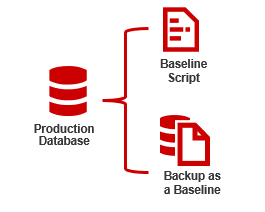
The backup as a baseline for SQL Server and Oracle has made a major difference. We no longer have to worry about running 1,000s of lines long SQL baseline scripts to get us to a known starting point. We simply restore a backup or use datapump in Oracle to get us to that starting point. This has also improved performance for working with large databases.
Improved drift detection; Snapshots in database and drift resolution scripts
The ability to check for drift in automated database deployment pipelines is incredibly important. If an unexpected change has happened in Production, e.g., a hot fix, then this might not be reflected in your earlier environments and introduces risk to your deployment.
Flyway Enterprise has always had drift detection for SQL Server, Oracle, PostgreSQL, and MySQL databases both on-prem and in the cloud. Last year, we’ve made it easier and faster by storing snapshots in the target database, so you no longer need to manage these in a network share. Using snapshots is also quicker than using a build environment and rebuilding the expected state in a temporary database. By storing the snapshot in the database, we eliminated the need for extra infrastructure to host this temporary database.
Our latest release at the end of December gives you a starting point if drift is detected with SQL Scripts to incorporate the drifted object into your other environments or revert the drift from the target. For SQL Server and Oracle, we also give you a filter file if you want to remove this object from the drift check. We hope this helps you easily resolve drift when/if it happens in your environment. Learn more about this feature in this blog.
Improved onboarding with Flyway Autopilot and more
Our Solution Engineers work with 100s of customers to try out and implement Flyway in their environments. They developed Flyway Autopilot as a sample project that you can use to get started quickly using sample databases that we provide or your own databases.
Last year, we integrated their tutorial into Flyway Desktop, so you can have a guided walkthrough of the end-to-end Flyway Desktop experience or capturing changes to a development database and generating migration scripts using this sample project. You can even continue and see how the sample project would be deployed in GitHub Actions or Azure DevOps Pipelines.
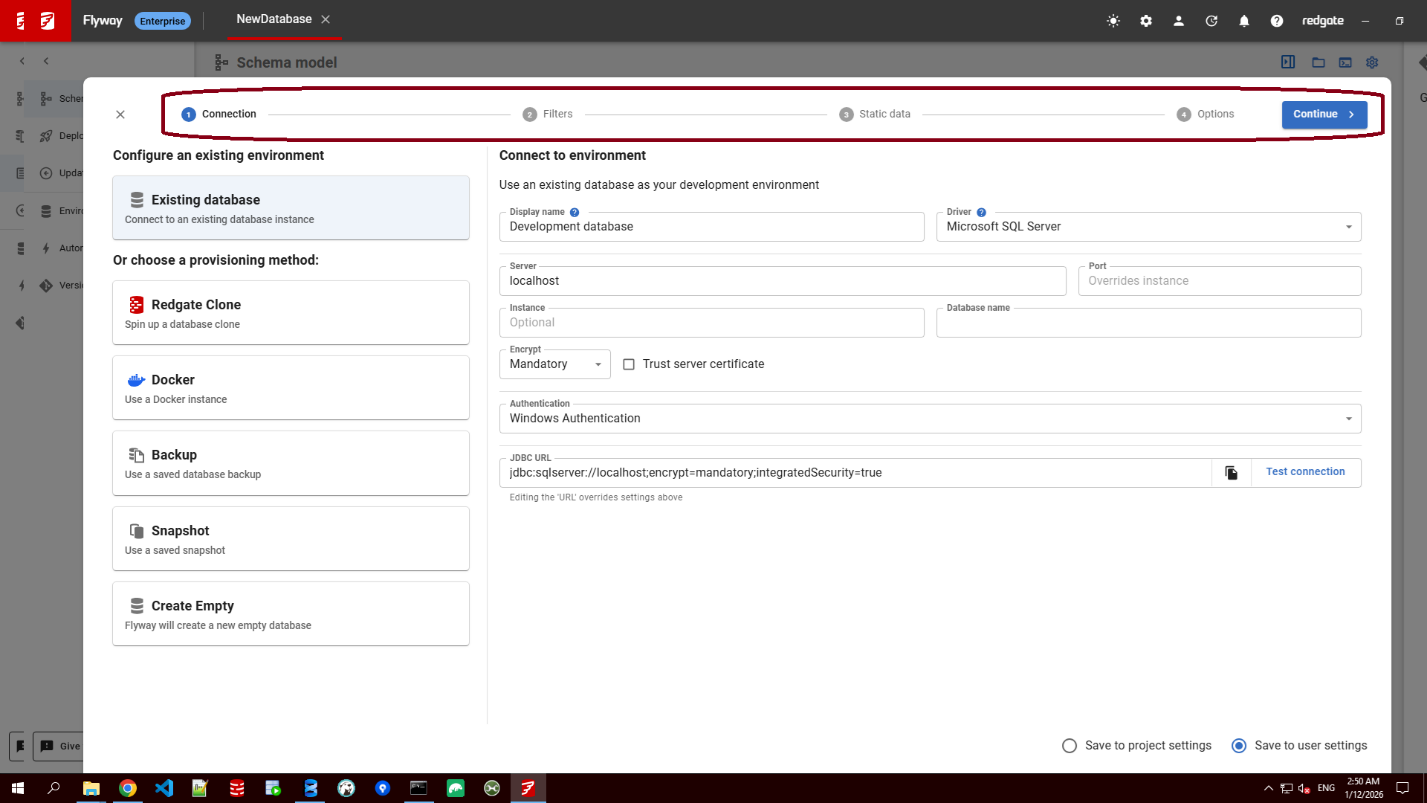
We also improved the start screen so new users can clone a Git repository directly from the main screen. For users setting up new projects, we provided a guided schema model wizard to make sure you get the right things into your schema model for new projects. This includes the objects you want to track, the static data you want to track, and any additional comparison options that you want to configure.
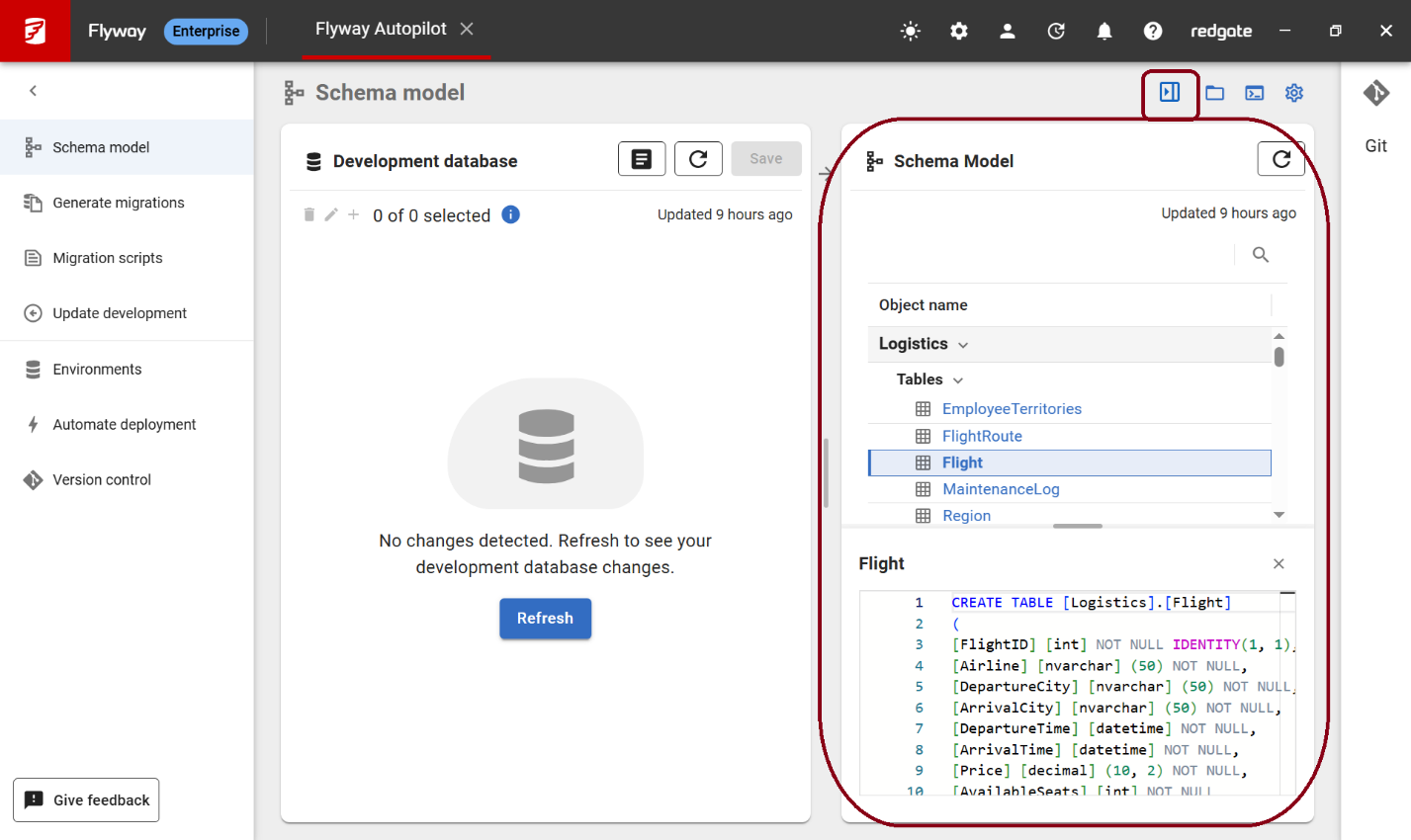
The full Schema model view has been added to the right-hand side so you can see how all your objects look on disk and this is also collapsible.
Code Reviews
There have been a few major changes in Code Reviews last year.
First, there are no longer any external dependencies to install to use our Code Reviews. This was a huge blocker and quite complicated. Most teams did not work through what was needed in order to set it up. Now, we ship everything you need along with best practice policies that apply to all databases. You can have these policies checked and enforced as part of a Pull Request (PR) process or as part of Continuous Integration.
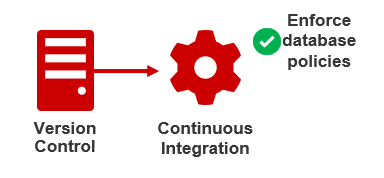
We’ve also implemented additional rules from Redgate to check for best practices and the ability to write your own rules. This should help enforce best practices and your company policies are being enforced on every deployment.
Finally, if you need to override a policy for any reason in a given script, we added that capability as well. We want the policies to work for you and not against you and we know there are sometimes exceptions that need to be made to get the job done.
Automate deployment page
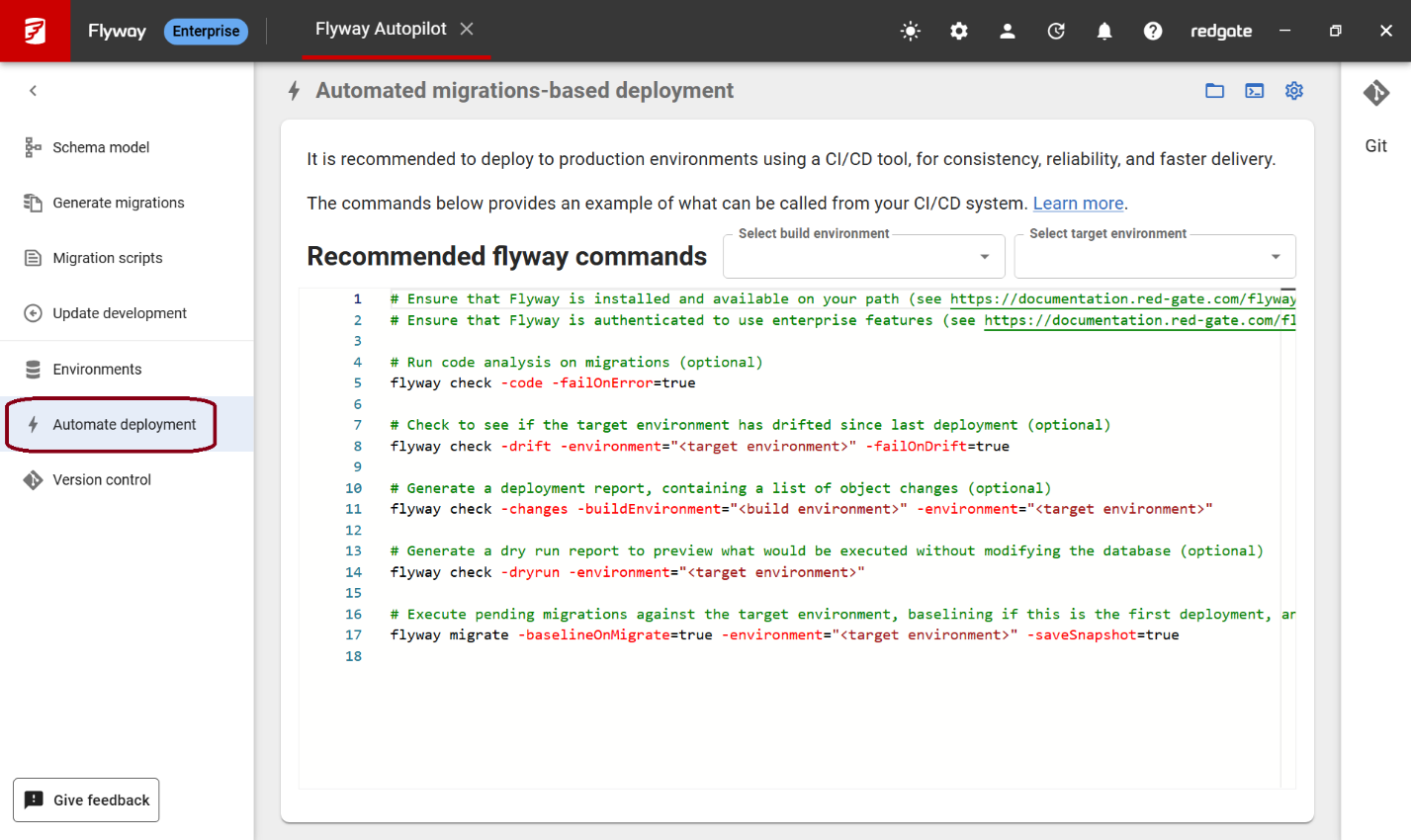
The Automate deployment page was added to Flyway Desktop to help make that step from development experience to deployment.
We provide sample flyway commands that you can try in the command line and integrate into your CI/CD systems to automate your deployments.
Flyway AI Enhancements
AI is everywhere now. We didn’t want to add AI just for the sake of adding AI. We wanted it to be helpful and safe for you to use, so we’ve started small and are looking for your feedback.
In 2025, we released:
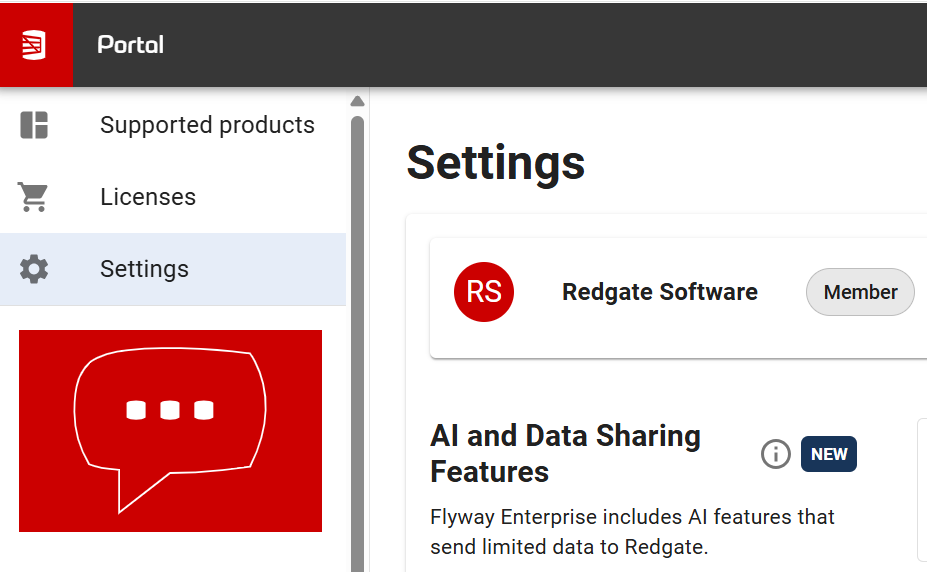
- The ability for organizations to opt-in to allow their users to use Redgate’s AI features in the Redgate Portal settings page . This gives you the control for how Flyway AI-Services are used in your organization. If you do not enable this, then users on that license will not have access to the Flyway AI features.
Once this is enabled at the organization level, then users can turn on or off the Flyway AI Services for themselves in their Flyway Desktop settings.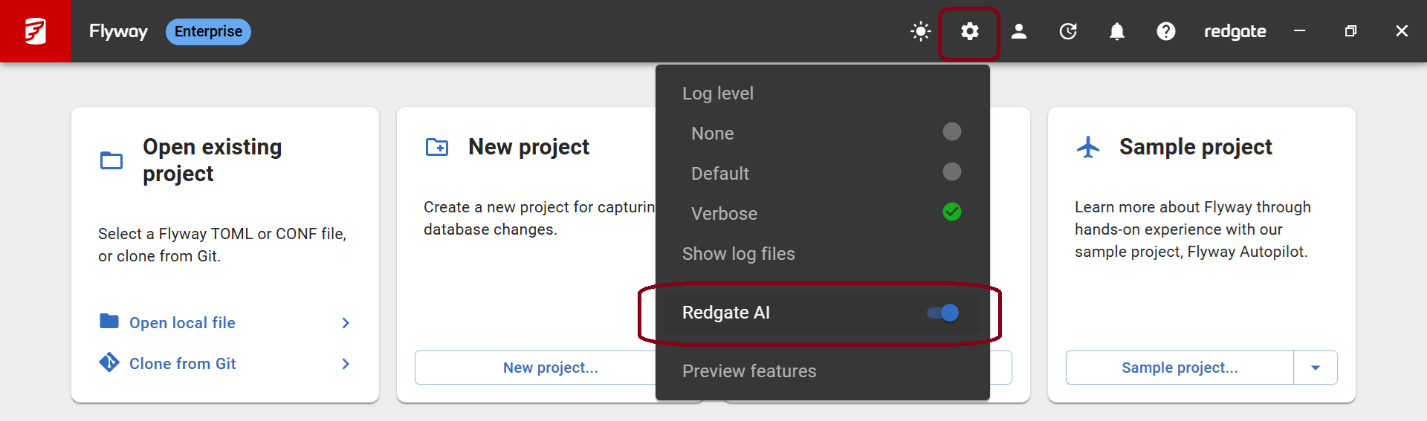
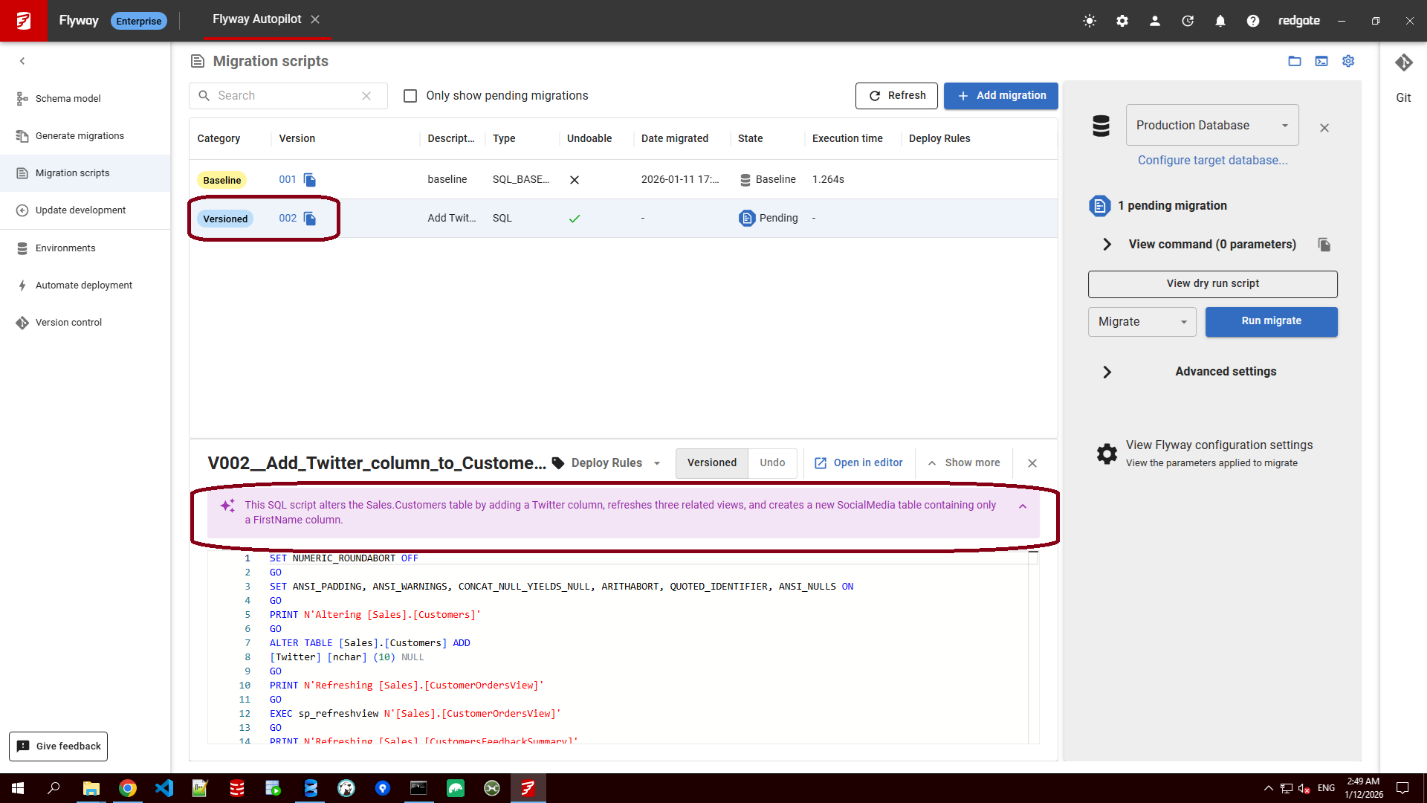
- Generating migration script descriptions – Instead of defaulting all generated versioned (and optionally undo) scripts to the name of the logged in user, Flyway AI will review the script and come up with a more meaningful description by default. You can override this and enter your own description for the script.
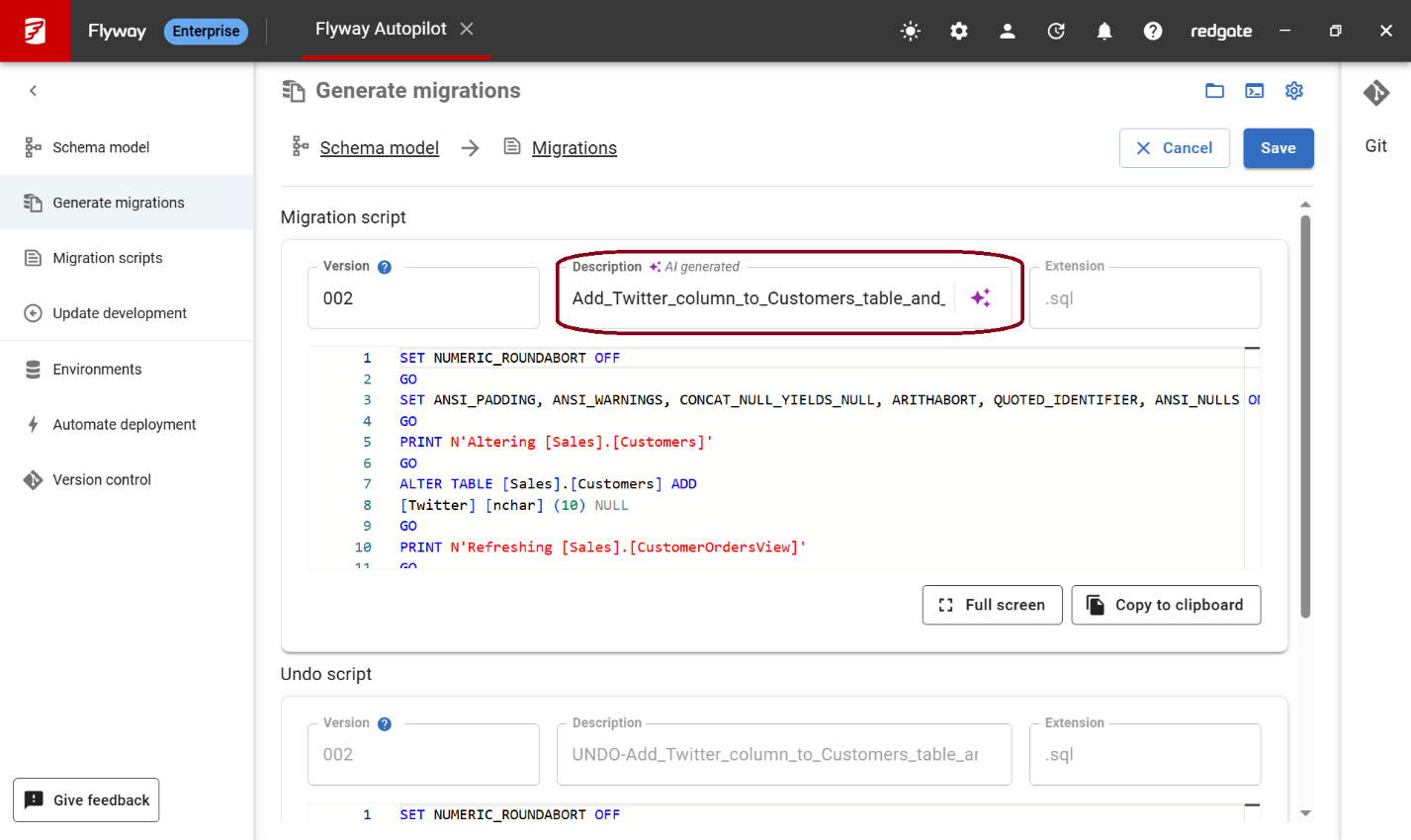
- Summarize migration script – Provides a short summary of the intent of a migration script, reducing the need to interrogate a script to understand its purpose.
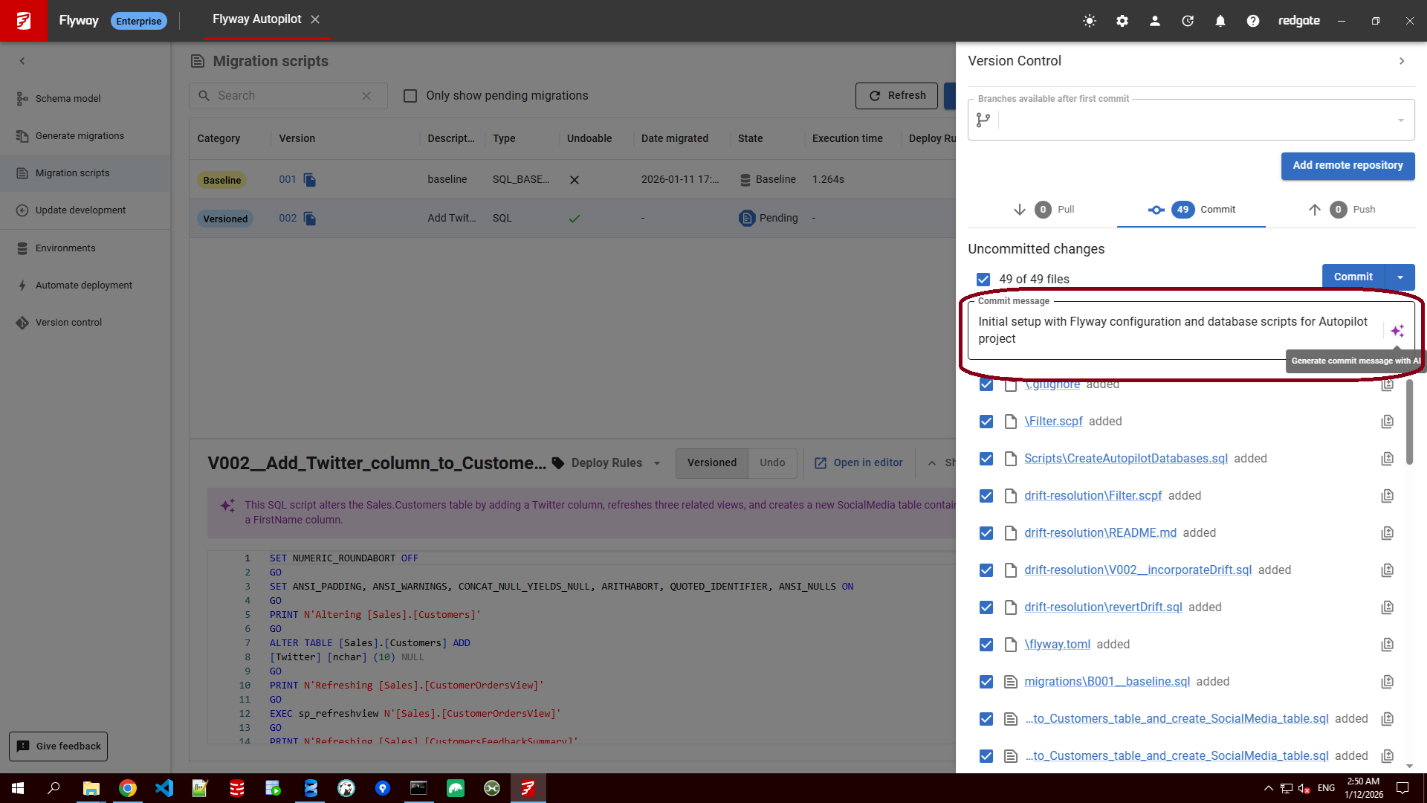
- Intelligent Commit messages –Select the objects/scripts you want to commit in the Git sidebar and then press the AI button to generate a sensible commit message.
Learn more about these Flyway AI Services in our documentation.
Expanding support for other databases
Redgate started developing for SQL Server over 25 years ago. We’ve had a solution for Oracle databases over 15 years ago. In the past 5 years, we’ve added comparison technology for PostgreSQL and MySQL and support for over 50 databases with a pure migrations approach.
Last year, we added additional advanced capabilities for PostgreSQL, Oracle, and MySQL, and added migrations support for MongoDB, which you can learn more about in the following links:
- Static Data for PostgreSQL
- Filter file for PostgreSQL and MySQL
- Partitioned tables for PostgreSQL
- Partitions for Oracle
- Native Connectors for MongoDB
What’s next?
Since this blog is already getting long, I’m going to devote a new blog for what’s coming in 2026. We’re already off to an exciting start with guided shadow setup and exposing code reviews in Flyway Desktop to fix issues before committing them. We’d love to hear from you about what we shipped last year and any other ideas to help us with our 2026 roadmap. If you’re interested, sign up for a 30 min Zoom call with our development team and look out for my next post.
Hope 2025 was a great year for you too and wishing you all the best in 2026!
This documentation contains proprietary information and is protected by copyright law.
Copyright © 2026 Red Gate Software Limited. All rights reserved


