REST API Authentication
Published 03 September 2026
Preview: The v2 API is in preview and may change without notice before it's generally available.
What this page covers: how to get an API access token and use it to authenticate requests.
Monitor's REST API is authenticated using tokens. The generation and configuration of the token is done via Monitor's UI and then is passed via the Authorization header in the request or used directly to authenticate access in your reporting application (e.g. PowerBI).
To access the Redgate Monitor API, you will need to create an access token.
Creating access tokens
- Select Configuration
 in the top menu of Redgate Monitor.
 - Choose Access tokens from the PowerShell API section.
- Click on Create new token to open the access token creation wizard.
- Enter a name, description (optional) and expiry date for the token. The default expiry date is one year after token creation.
- Select the desired role for the access token. More information about token roles can be found here. Please note that administrator tokens are granted access to all groups and monitored servers.
- In the Access Rights section, select the desired servers the token should have access to.
- Click Continue and review the token details.
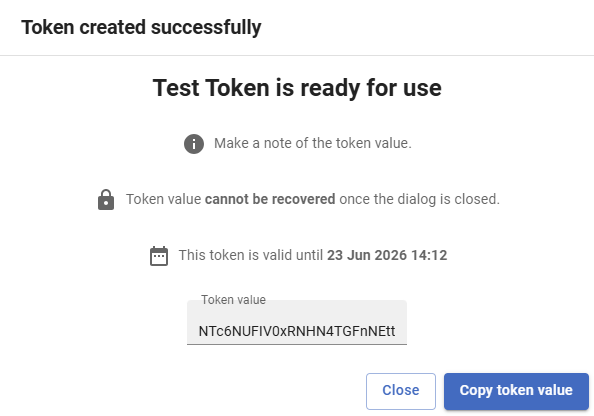
- Click Create. A new token will be generated and a dialog will display the token itself.
- This is the only time you can access the token, so note it down somewhere safe.
Screenshot of a new token
Deleting access tokens
Tokens can be deleted from Redgate Monitor in the table of tokens.
Using your token
In order to authenticate, the token must be passed as a bearer token in the Authorization header. Here is an example of how that is formatted
curl https://your-host/api/v2/monitored-servers \
  -H "Authorization: Bearer $TOKEN"
Here is a working example where the token is: NTc6NUFIV0xRNHN4TGFnNEtt
curl https://your-host/api/v2/monitored-servers \
  -H "Authorization: Bearer NTc6NUFIV0xRNHN4TGFnNEtt"
Every request need will need this header. There's no separate query parameter or cookie option for authenticating.
Your reporting application will usually allow you to pass this token into the header within its UI. You should read your reporting application documentation to find out how to do this.
You can also use our walkthrough guides to connect to some common reporting applications:
Troubleshooting
There are a few common authentication issues which may occur:
- Forgetting the
Bearerprefix in theAuthorizationheader. This returns a 401, not a message about the missing prefix. - In the case of a Base Monitor outage, the API will return 502 or 503 error codes.
- Assuming a token can see your whole estate. It only sees what your Monitor user account can see. Check permissions in Monitor first if an expected server is missing from a response.
Next steps
Make your first request with your authentication token.
This documentation contains proprietary information and is protected by copyright law.
Copyright © 2026 Red Gate Software Limited. All rights reserved


