SQL Doc Compatibility Update for SSMS 22.3
Published 18 February 2026
Overview
Starting with SQL Server Management Studio (SSMS) 22.3, SQL Doc versions 5.5.2 or below causes SSMS to crash during startup or when Object Explorer in SSMS is accessed.
SQL Doc 5.5.3 includes fixes to ensure compatibility with SSMS 22.3, along with installer changes to warn users and prevent unexpected crashes.
This issue affects only SSMS 22. Earlier SSMS versions (SSMS 21 and below) are not impacted.
What caused this issue
SSMS 22.3 introduced changes to internal components used by extensions. Versions of SQL Doc 5.5.2 or below depend on earlier version of these components.
When loaded in SSMS 22.3, this mismatch causes SSMS to crash during startup or when Object Explorer in SSMS is accessed.
What users need to do
If you are using SSMS 22.3
- Upgrade to SQL Doc 5.5.3
If you are using SSMS 22.2 or below
- SQL Doc version 5.5.2 or below will continue to work.
- Do not upgrade to SQL Doc 5.5.3 until SSMS is updated to version 22.3
Installer changes in SQL Doc 5.5.3
When installing SQL Doc 5.5.3, the installer checks for installed SSMS version. You can download the latest version of SQL Doc from this page.
If SSMS version 22.2 or below is detected
- A compatibility warning is shown during installation
- You can choose to continue by clicking on OK button
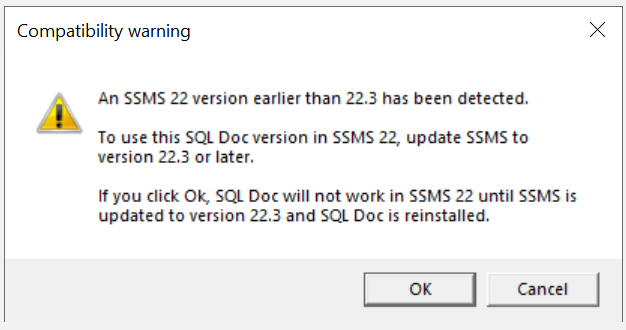
If you click OK
- SQL Doc installs successfully
- It will not work in SSMS 22 until SSMS is updated to 22.3 and SQL Doc is reinstalled
- SQL Doc continues to work in SSMS 21 and earlier
If you cancel, the installation does not proceed and no changes are made.
If SSMS 22.3 is detected
- No warning is shown
- Installation proceeds normally
Important: Other Redgate Tools and SSMS 22.3
The following Redgate products are now compatible with SSMS 22.3
- SQL Prompt - Learn More.
- SQL Test- Learn More.
- SQL Dependency Tracker - Learn More.
- SQL Data Generator - Learn More.
- SQL Search - Learn More.
What this means for users
- If SQL Doc is installed alongside the above Redgate tools in SSMS 22.3, ensure that compatible versions of all tools are installed, as specified in their respective documentation.
Summary
SQL Doc 5.5.3 supports SSMS 22.3
SQL Doc versions 5.5.2 or below will crash SSMS 22.3 during startup or when Object explorer is used.
This documentation contains proprietary information and is protected by copyright law.
Copyright © 2026 Red Gate Software Limited. All rights reserved


