
These pages cover SQL Clone Beta 0.6 to 0.9, which is not the latest version. Help for other versions is also available.

Fully removing an old version
If you have installed any previous version of SQL Clone, you can ensure it's fully removed by:
- Removing all clones within the application, and deleting the folder "localappdata%\Red Gate\SQL Clone\clones"
- Removing all images within the application, and deleting any files left on disk
- Uninstalling the old version
- Rebooting the machine
- Ensuring that there are no services called "Redgate SQL Clone" or "Redgate SQL Clone Agent"
Getting set up
First, check the requirements and limitations pages to ensure your system is compatible.
Error 1923. Service 'Redgate SQL Clone Agent' (Redgate SQL Clone Agent) could not be installed. Verify that you have sufficient privileges to install system services.
This can also mean a service with that name already exists. Ensure any previous SQL Clone installations are removed, and try again.
Could not execute "...VCRedist2015": Installation error 1 when running
Ensure your system is 64-bit, there are no plans to support 32-bit operating systems.
Problems during configuration wizard
This usually happens when the installed service cannot start. Check the Application section of the Windows Event Viewer for extra information.
Where is SQL Clone?
SQL Clone serves a web app accessible in your browser at: http://machinename:14145
Someone in your organization should be able to tell you the relevant machine name where the SQL Clone Server is installed.
SQL Clone Agent installation
"An existing connection was forcibly closed by the remote host" error during SQL Clone Agent installation
When the SQL Clone Agent installation fails, you might see an error among Windows Application Event Logs, which is similar to below one:
System.Net.Http.HttpRequestException: An error occurred while sending the request. ---> System.Net.WebException: The underlying connection was closed: An unexpected error occurred on a send. ---> System.IO.IOException: Unable to read data from the transport connection: An existing connection was forcibly closed by the remote host. ---> System.Net.Sockets.SocketException: An existing connection was forcibly closed by the remote host
  at System.Net.Sockets.Socket.EndReceive(IAsyncResult asyncResult)
  at System.Net.Sockets.NetworkStream.EndRead(IAsyncResult asyncResult)
  --- End of inner exception stack trace ---
  at System.Net.TlsStream.EndWrite(IAsyncResult asyncResult)
  at System.Net.ConnectStream.WriteHeadersCallback(IAsyncResult ar)
  --- End of inner exception stack trace ---
  at System.Net.HttpWebRequest.EndGetRequestStream(IAsyncResult asyncResult, TransportContext& context)
  at System.Net.Http.HttpClientHandler.GetRequestStreamCallback(IAsyncResult ar)
  --- End of inner exception stack trace ---
  at System.Runtime.CompilerServices.TaskAwaiter.ThrowForNonSuccess(Task task)
  at System.Runtime.CompilerServices.TaskAwaiter.HandleNonSuccessAndDebuggerNotification(Task task)
  at RedGate.SqlClone.Agent.ManagementServiceClient.JsonHttpClient.<Post>d__5`2.MoveNext()
--- End of stack trace from previous location where exception was thrown ---
  at System.Runtime.CompilerServices.TaskAwaiter.ThrowForNonSuccess(Task task)
  at System.Runtime.CompilerServices.TaskAwaiter.HandleNonSuccessAndDebuggerNotification(Task task)
  at RedGate.SqlClone.Agent.ManagementServiceClient.RegistrationClient.<Register>d__2.MoveNext()
This error may occur when SHA512 is disabled in Windows when you use TLS 1.2 on the machine where you are trying to install the SQL Clone Agent on. You can check whether this is the case by looking at the "HKEY_LOCAL_MACHINE\SYSTEM\CurrentControlSet\Control\Cryptography\Configuration\Local\SSL\00010003" REG_MULTI_SZ registry value and see if you can see "RSA/SHA512" there like you do in below image:
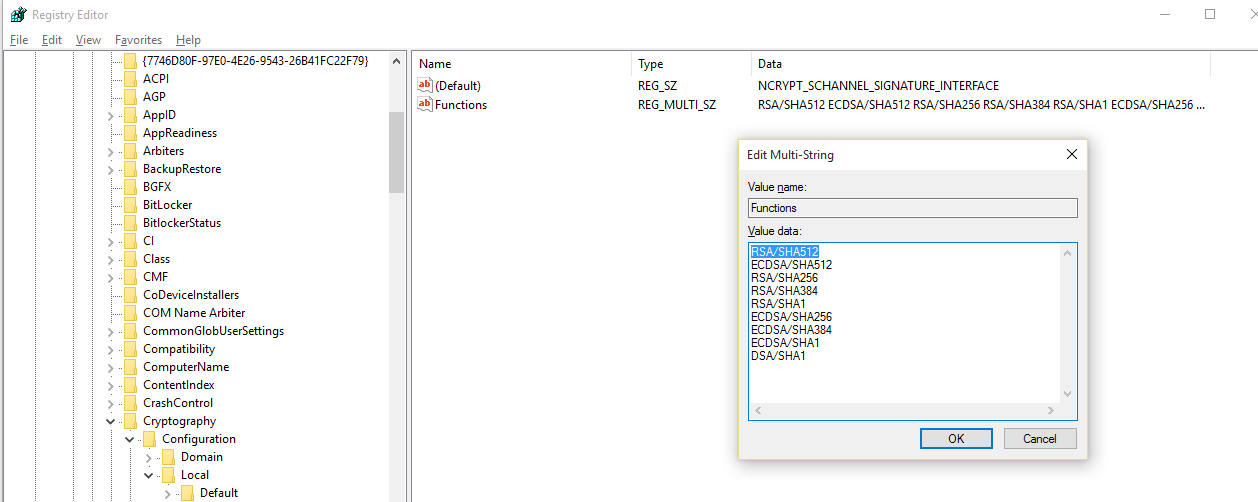
- You can add "RSA/SHA512" to "HKEY_LOCAL_MACHINE\SYSTEM\CurrentControlSet\Control\Cryptography\Configuration\Local\SSL\00010003" REG_MULTI_SZ registry value. This requires you to restart your machine and retry the installation of SQL Clone Agent.
- We can see that there Windows Updates available which address this issue: KB2975719 and KB2975331. You can install one of these depending on your operating system, restart your machine and retry the installation of SQL Clone Agent.
Creating an image
The requested operation could not be completed due to a file system limitation (Win32Exception)
Ensure the image destination you chose has more free space than the size of your database, and ensure the disk is defragmented.
I can see failed images on Web UI and I cannot delete them
Unfortunately, we don't currently have a way to clear out the failed items on the Web UI. However, we are aware of this restrictions and it's on our backlog to get it done. As a workaround, you can run the below update command against our config database. it will mark those failed images as deleted. Please make sure that the database name reflects the database name that you configured it to. It's "SQLClone_Config" by default.
UPDATE [SQLClone_Config].[dbo].[Images] SET [State] = 4, DeletedOn = GETUTCDATE()
WHERE [State] = 6 AND DeletedOn IS NULL;