
These pages cover SQL Clone Beta 0.6 to 0.9, which is not the latest version. Help for other versions is also available.

The majority of SQL Clone installation issues occur because the OS does not have the latest updates.
Install the latest OS updates, and check the requirements and limitations pages to ensure your system is compatible before proceeding.
Where is SQL Clone?
SQL Clone serves a web app accessible in your browser at: http://machinename:14145
Someone in your organization should be able to tell you the relevant machine name where the SQL Clone Server is installed.
Specific issues with...
Getting set up
Normal usage
Getting installer logs
SQL Clone's two components (the server and agent) use different installers.
SQL Clone installer
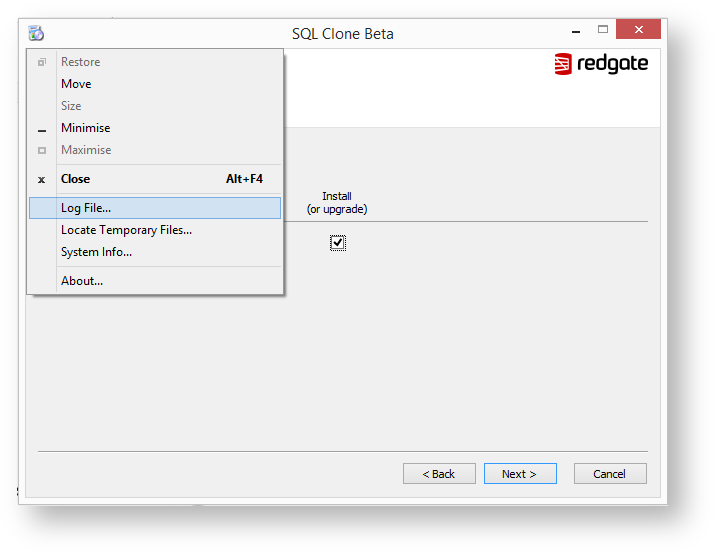
Click the icon in the top left corner of the installer when an error occurs and choose "Log file" to locate the log file in order to share it with us.
SQL Clone Agent installer
If installation of the SQL Clone Agent fails, the installer will offer to open the logs. You can also check %LOCALAPPDATA%\Red Gate\Logs\SQL Clone\Installer for the agent installer logs in the event of failure.
Fully removing an old version
If you have installed any previous version of SQL Clone, you can ensure it's fully removed by:
- Removing all clones within the application, and deleting the folder "localappdata%\Red Gate\SQL Clone\clones"
- Removing all images within the application, and deleting any files left on disk
- Uninstalling the old version
- Rebooting the machine
- Ensuring that there are no services called "Redgate SQL Clone" or "Redgate SQL Clone Agent"