AI in SQL Prompt FAQ
Page last updated 13 August 2026
Published 04 September 2025
General Redgate AI information
Redgate AI features — including Redgate Assistant, SQL Prompt AI, Monitor AI, and AI services in Flyway — are opt-in. They don't run by default, and an individual user has to take affirmative action before any data is sent to them.
If you're part of a Redgate organization, an organization admin can also control AI access for everyone in that organization at once, through Redgate Environment AI and Data Sharing Features. This setting covers Redgate Assistant, SQL Prompt, Monitor, and Flyway. Test Data Manager works differently — see Test Data Manager below.
Turning AI features on or off for your organization
- Sign in to the Redgate Portal as an organization admin.
- Go to Settings.
- Under Redgate Environment AI and Data Sharing Features, switch Enable/Disable AI Features on or off.
This is a single, organization-wide setting — there's nothing to configure per product or per domain.
Only an organization admin can change this setting. If you don't manage an organization, or don't know who does, contact whoever administers your Redgate licenses, or see Creating a Redgate Organization.
Test Data Manager
Test Data Manager isn't covered by the setting above. To opt out of AI features in Test Data Manager, contact support@red-gate.com and ask for your domain to be added to the block list.
Product-level controls
Some products also offer controls for individual users or instances, separate from the organization-wide setting:
- SQL Prompt: Enabling/disabling SQL Prompt AI, Enabling/disabling Redgate Assistant in SQL Prompt
- Monitor: Disabling use of Monitor AI
- Flyway: AI services in Flyway
These are useful if you want to turn AI off (or one of its sub-features) for one person or one instance without changing the setting for your whole organization. They don't replace the organization-wide control above.
If you previously asked us to block your domain
If you use Redgate Assistant, SQL Prompt, Monitor, or Flyway, and previously asked Support to add your domain to a block list, that process has been replaced by the self-serve setting above — you no longer need to contact Support to opt out.
If you use Test Data Manager, keep using the block list process described above.
Please refer to the Redgate AI Hub for more information about Redgate AI.
SQL Prompt specific AI information
SQL Prompt’s AI-powered features help you to write, review, and optimize SQL faster by combining its understanding of your database schema and SQL expertise, with the power of generative AI and machine learning. Write and modify SQL accurately using natural language, get clear explanations of unfamiliar code, and uncover performance-boosting index suggestions in seconds — all without leaving SSMS. The AI-powered features are opt-in to give you control over how and when you adopt AI into your workflow.
We have three AI-powered features in SQL Prompt:
- SQL Prompt AI - Inline AI helper
- Redgate Assistant (Preview) - AI chat
- Query Index Analysis - AI-based query index performance evaluator
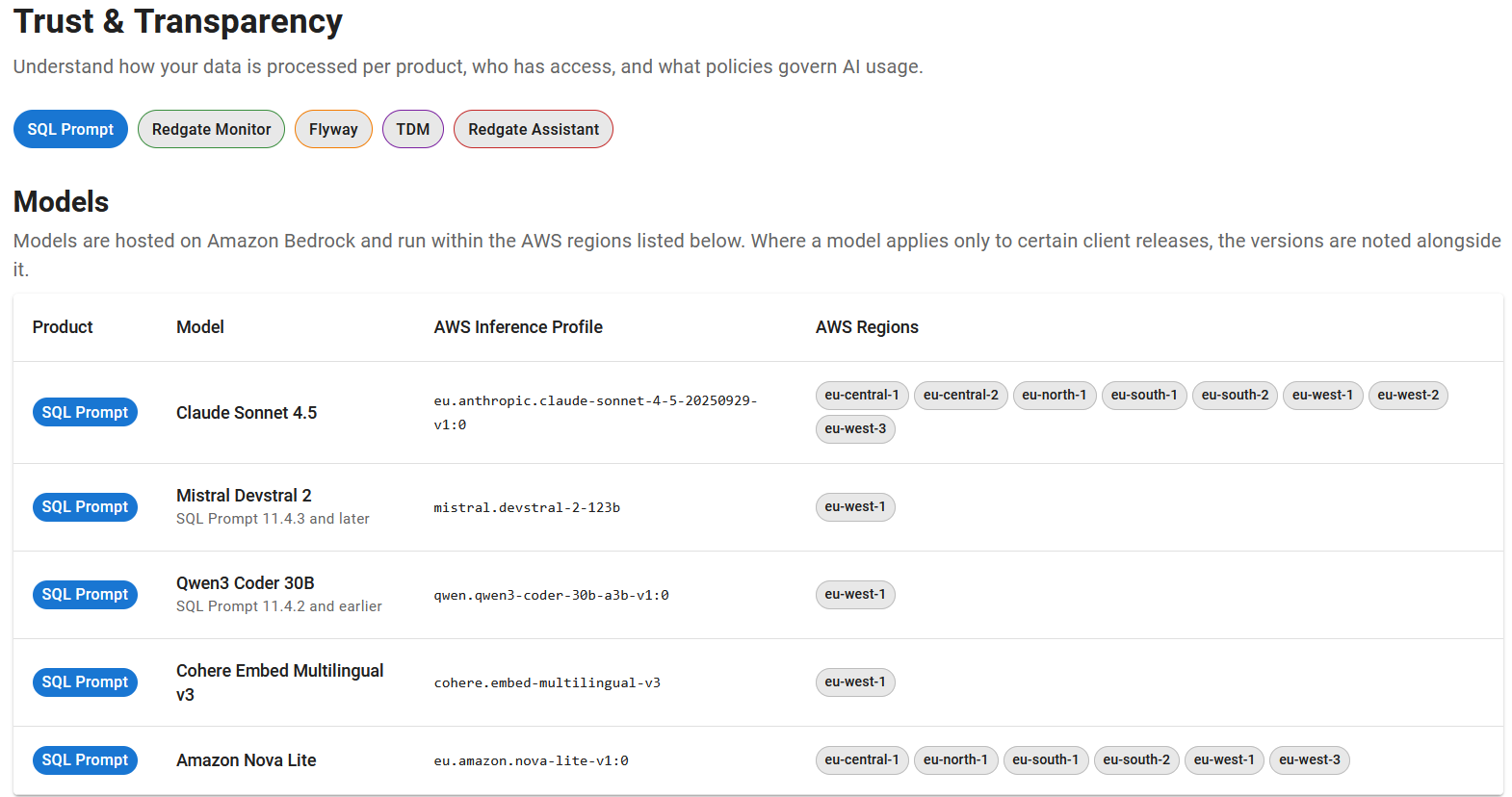
Both SQL Prompt AI and Redgate Assistant (Preview) use public AI models.
1. Prompt AI:
SQL Prompt AI provides the following functionality directly in your SSMS/VS query editor window:
- Natural language AI prompts (Text-to-SQL) - Write and modify SQL using natural language. SQL Prompt AI transforms your words into schema-aware AI requests that will create a response from our Prompt AI services that will be directly inserted into your SSMS query window. Modifying SQL is easy too, just highlight your code and instruct SQL Prompt to change it using natural language in your query window. AI responses will work with SQL Prompt’s formatting, refactoring and code analysis features to ensure code is consistent and accurate.
- Explain SQL - Make sense of legacy code, complex logic, or someone else’s work fast. With SQL Prompt’s Explain SQL feature you can highlight your chosen SQL and get an instant translation of what the code does in everyday language.
- Fix SQL - Fix syntax or logical errors with a click. SQL Prompt will identify errors in SSMS and attempt to resolve them using Prompt AI.
- Optimize SQL - Speed up slow queries by using the Optimize SQL action in Prompt AI. The highlighted SQL will be analyzed, optimized, and annotated by Prompt AI. It will aim to apply only safe recommendations, while more impactful changes—such as creating indexes—will be provided as commented suggestions.
- AI code completion (Preview) - Generates multi-line blocks of code based on your query's context and even natural language comments, allowing you to write complex queries faster and with less effort, right inside your query window.
- Intelligent context-aware suggestions - Prompt AI offers two types of contextual-aware suggestions to help you form your AI prompts:
- Initial personalized suggestions - If Generate initial suggestions using SQL History option is enabled, SQL Prompt AI will create context-aware suggestions based on randomly selected recent SQL queries from SQL History.
- Follow-up suggestions - These are automatically generated in the Prompt AI window after you first AI prompt is processed and provide contextual-aware potential continuations to your previous AI prompts (e.g. introduce additional filters on a
SELECTstatement).
Please see working with SQL Prompt AI for more details on existing functionality.
2. Redgate Assistant (Preview):
Redgate Assistant (Preview) is a general-purpose chatbot with SQL expertise designed to help with all aspects of database development. As such, it's capable of performing many tasks.
Additionally, it's enhanced with SQL Prompt functionality to further refine its skillset and capabilities.
You might ask Redgate Assistant to:
- Perform a code review on one of your queries.
- Write a new query from scratch based on your requirements.
- Give advice on how best to create an index for a table.
- Ask to explain how a certain script works.
- Fix errors in a given query.
- Optimize T-SQL for performance and effectiveness.
See Redgate Assistant documentation for further details.
3. Query Index Analysis:
Query Index Analysis, when triggered by the user, leverages an internal Redgate LLM (and not a third party LLM), and offers the following functionality:
- Improve SQL query performance - Get clear, actionable advice on what indexes you need to improve query performance. Query Index Analysis evaluates the potential impact of different indexes and delivers smart recommendations for improvement.
Query Index Analysis will provide a recommendation to the user, and does not itself change the database.
SQL Prompt .As of 12/08/2026 :

The SQL Prompt AI feature Query Index Analysis also uses an internal Redgate ML model. The model that backs Query Index Analysis is trained on Redgate's proprietary internal datasets, which are derived from publicly available databases. No customer data is used to train this model.
- Built into SQL Prompt: the industry-leading SQL code completion tool - For nearly 20 years, SQL Prompt has been a favorite among database professionals, thanks to its ability to make SQL coding faster, easier, and error-free from day one. The new AI-powered capabilities join a range of productivity-enhancing features — such as smart code completion, reusable code snippets, instant formatting, refactoring and code analysis — all grounded in SQL best practices and a deep understanding of your database schema.
- These new features are designed to work with other functionality within SQL Prompt to deliver accurate, context-aware results that speed up your coding. For example, before presenting AI-generated suggestions, SQL Prompt ensures they match your existing formatting style. Its built-in code analysis and auto-fix functionality also help resolve errors and ensure code follows best practices.
- No extra cost or set-up - SQL Prompt’s AI-powered features are included in an active subscription to SQL Prompt, SQL Toolbelt and SQL Toolbelt Essentials (perpetual licenses are excluded). No extra costs or set up required. All you need to do is opt-in to use them.
- Intelligent context-aware suggestions - As with any new feature, getting confident with using AI takes practice and trial and error. SQL Prompt’s initial personalized and follow-up suggestions (see working with SQL Prompt AI) give you a helping hand by analyzing your SQL and providing contextual, clickable prompts in the Prompt AI window to guide you on what to ask.
- AI chatbox that understands T-SQL and SSMS - Redgate Assistant (Preview) is your AI buddy that understands the dynamics of T-SQL and the interactions required with SSMS.
- Query Index Analysis - Powered by Redgate’s machine learning model, Query Index Analysis evaluates the potential impact of different indexes and delivers smart recommendations for improvement. The result? Code that is optimized for speed from the start.
- Underpinned by over 25 years of SQL Server expertise - The new AI-powered capabilities are backed by Redgate’s over 25 years' experience with SQL Server.
See Prerequisites section in Enabling/Disabling AI features in SQL Prompt.
SQL Prompt’s AI-powered features are available in version 11.1.0.18267 onwards with an active subscription to SQL Prompt, SQL Toolbelt Essentials or SQL Toolbelt (perpetual licenses are excluded). Once you have this version installed, you will be able to opt-in to the Prompt AI features by following instructions in enabling/disabling SQL Prompt AI.
Before you begin, check the prerequisites section above for everything that is required to be able to use Prompt AI services.
To access the AI features, simply highlight some T-SQL in your SSMS/VS query window and right click to show the SQL Prompt context menu. Then select any of the following:
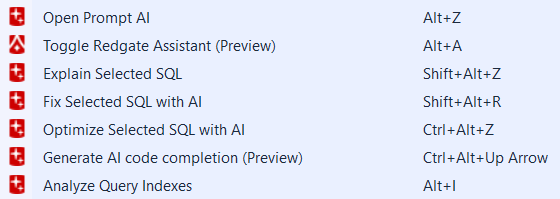
You can also open the Prompt AI window using the shortcut ALT+Z or the Prompt AI icon in the SQL query window if the option Show icon for editor selection is enabled. See working with SQL Prompt AI for more information.
Likewise, Redgate Assistant (Preview) can be triggered with ALT+A keyboard shortcut.
Prompt AI has a fair usage rate limit in place of approximately 10 prompts every 5 minutes. Once this limit is reached, users will see a message notifying them that they’ve hit the cap.
The new AI code completion (Preview) also has built-in fair usage rate limits and due to the nature of it being an experimental feature it may be changed, removed, or stop working at any time.
Likewise Redgate Assistant (Preview) also comes with fairly generous usage limits.
Please check SQL Prompt AI data handling. Also, be sure to check Redgate AI Hub and filter by SQL Prompt .
As of 12/08/2026 :

This documentation contains proprietary information and is protected by copyright law.
Copyright © 2026 Red Gate Software Limited. All rights reserved